
DESelect is an incredibly valuable tool that every business that uses Marketing Cloud should try at least once. The team at DESelect couldn’t be nicer and supportive to all of their prospective customers, there’s no reason not to reach out and explore how the tool can improve your marketing automation.
Here are five reasons why everyone who uses Marketing Cloud should try DESelect.
1.) Free Trial!
You can give DESelect a test run without paying a dime. It’s a great way to explore their extensive features and most importantly upgrade your SQL code. Reach out to the friendly folks at DE Select to learn more about the free demo/trial: https://deselect.com/
2.) Queries made simple 1-2-3
The best thing about DESelect is their super easy interface that allows you to create complicated queries in three easy steps. No more starting with a blank SQL canvas and starting from scratch. With DE Select you just follow the three steps using clicks not code to create complex queries in minutes.
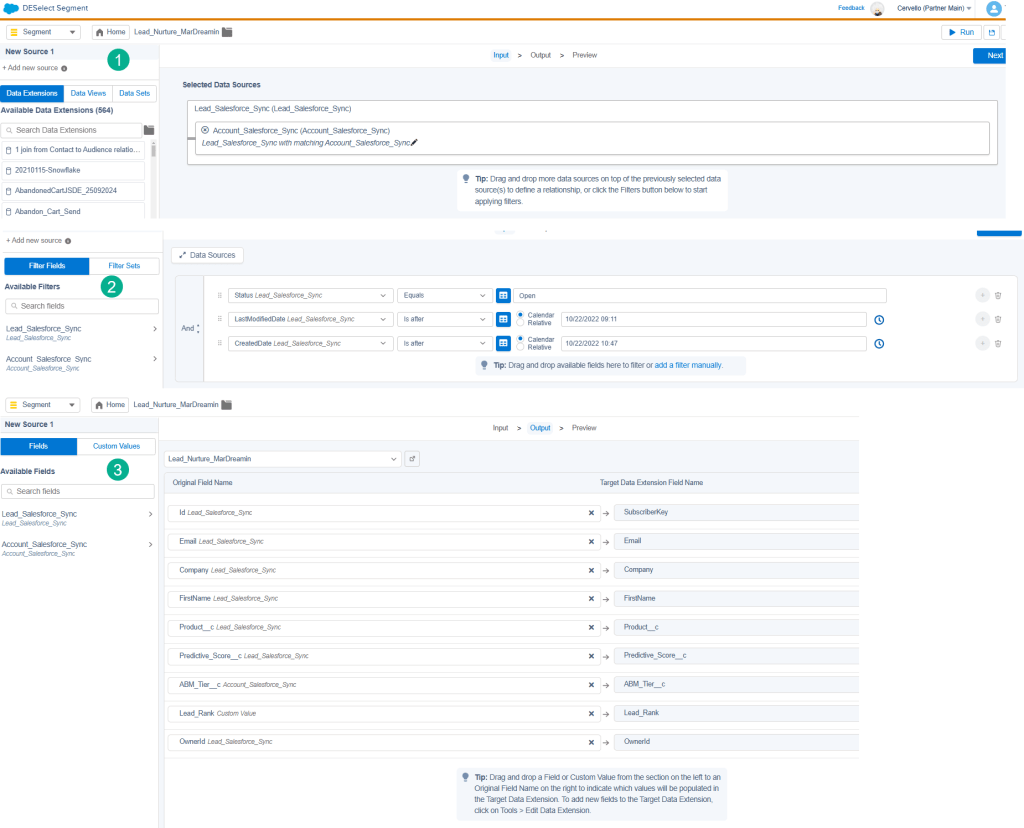
(1) On the Selection Criteria page (creating your FROM section) simply drag over the data extensions that you want to pull the data into the query. All of your data extensions are available in one easy window in alphabetical order.
(2) To make the WHERE section super easy, simply drag and drop any field from any of the data extensions set in the FROM section. Take a look at the options available for each filter value:
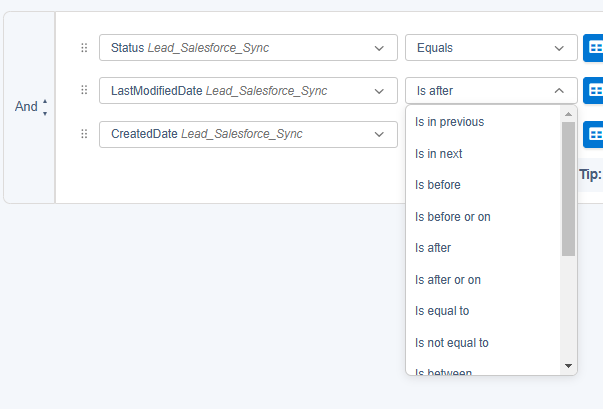
Did you every think that there were this many ways to filter a variable in a Marketing Cloud SQL Query? Simply exploring the capabilities of DE Select will open your eyes to different ways to segment your data and advance your marketing. Plus you can see the amazing SQL code under the cover to see how DESelect coded each one of these cool options.
(3) Last but not least creating the SELECT is as easy as dragging and dropping values from the data extensions that you selected in section 1. No more fumbling with naming conventions, missing a comma, using a Max/Min on Group by, etc. DE Select takes care of all of that syntax saving you hours.
We love SQL but everyone has to admit using DESelect over a blank SQL query in Query Studio will give you a leg up.
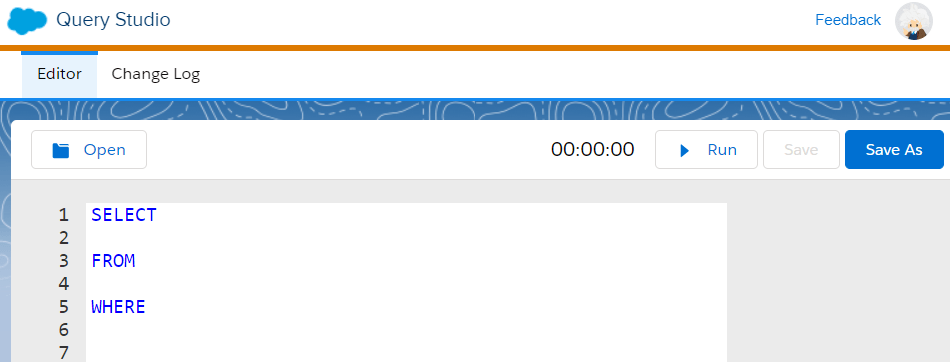
Try DE Select to avoid the blank SQL canvas blues.
3.) Easy configuration of complex data relationships in the FROM Statement
The benefits of DESelect don’t stop at the intuitive UI. In each area of the application they make complex data alignment easy as a few clicks.
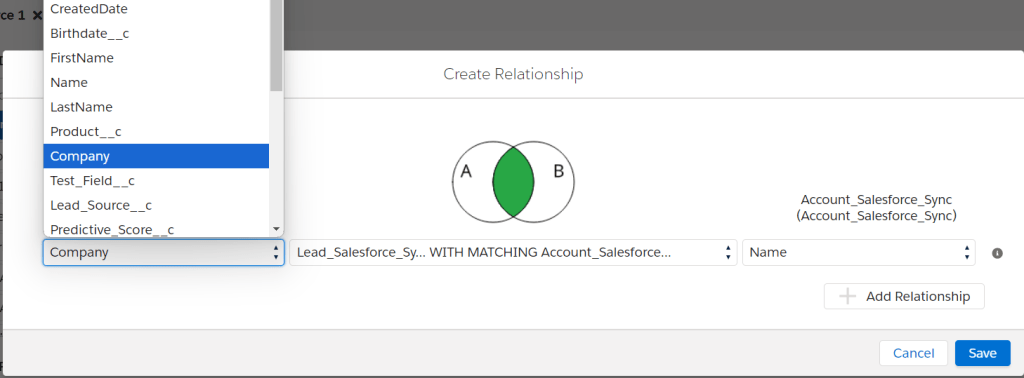
In data sources section whenever you JOIN a new data extension this handy window pops up giving you the ability to connect the DEs by selecting any of the variables available in both DEs. No need to open up another tab and copy and paste the fields from both Data Extensions.
What’s more if there’s a field that is a natural match DESelect will set it as a default!
Wait, there’s more…What if your JOIN isn’t an INNER join, but should be a LEFT, RIGHT or another join. There’s a drop down menu to quickly and easily select the different types of joins and a visual to help confirm the alignment.
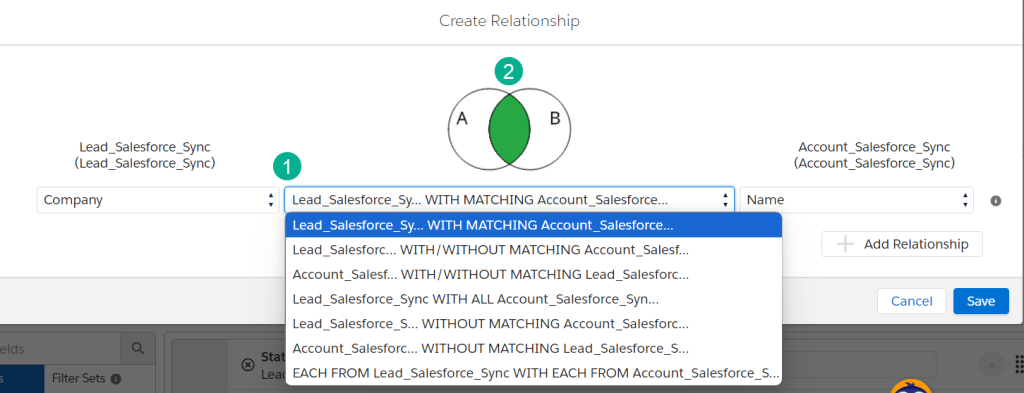
(1) The DESelect interface has a data relationship graphic helping the user determine visually the best option.
(2) Look at all of the data relationship options available, LEFT, RIGHT, OUTER Joins and more!
4.) Custom values in the SELECT statement using advance CASE logic
I don’t know how they do it, but you got to check out the ability to create IF/THEN logic in the target definition section of DE Select.
In our use case we needed to combine two different lead ranking systems in our DE Select solution. Using the Custom Values section under the Target Definition section we were able to combine not only those two rankings but also in a multitude of combinations.
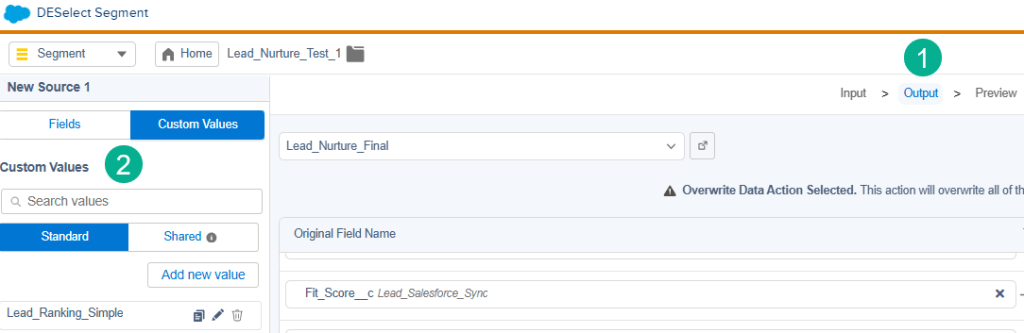
(1) Under the Target Definition section.
(2) Create a new Custom Value.
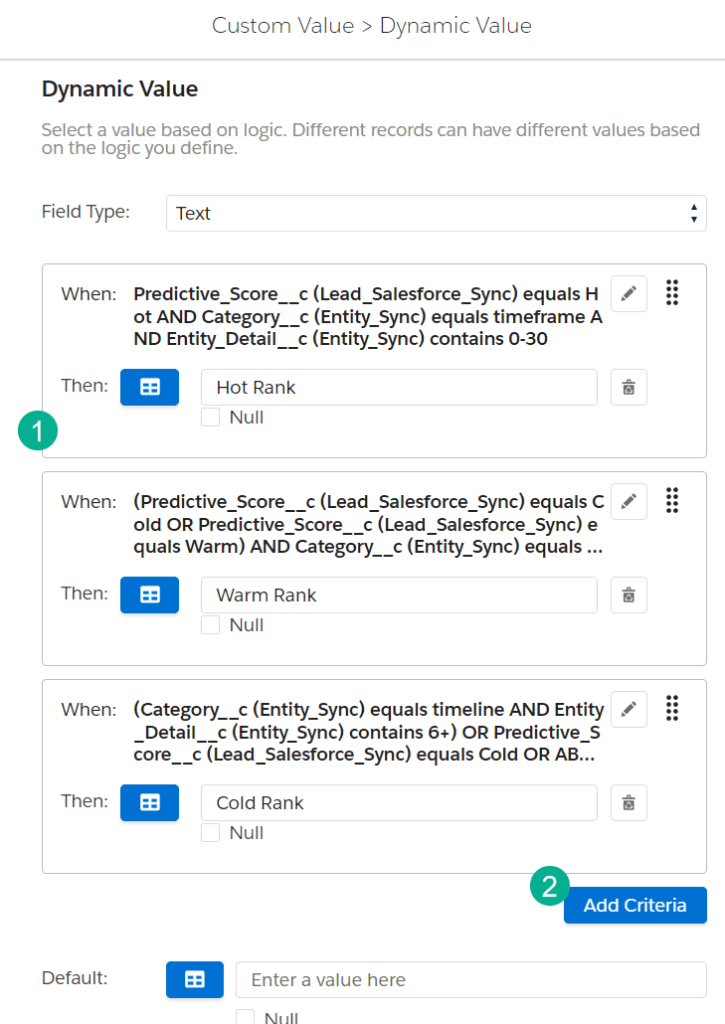
(1) We created three different criteria of “Hot”, “Warm” or “Cold” ranking that was dependent on a variety of filters we’ll go over in the next screen.
(2) Adding additional criteria is as simple as clicking a button.
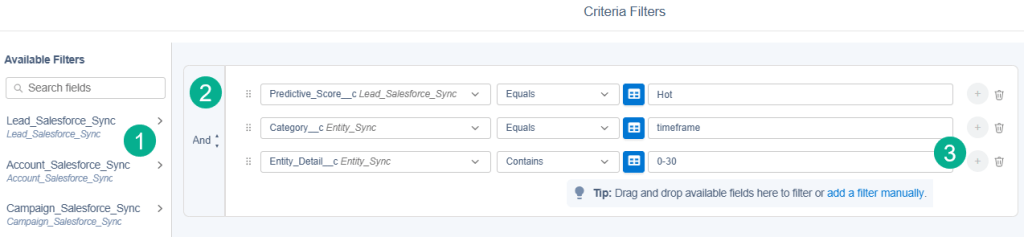
(1) For each criteria you simply create a nested WHERE statement pulling any value from the data extensions in the FROM section.
(2) You can select any combination and groupings of AND/ORs to find the right filtering.
(3) This filter combines three values from two different data extensions to determine this one scenario. All by clicks, not code.
5.) YOU GET THE SQL CODE!!!
The BEST thing about DESelect is that after making a few quick selections in their super easy UI creating super complex SQL, DESelect creates the query automatically and you get to see their SQL!
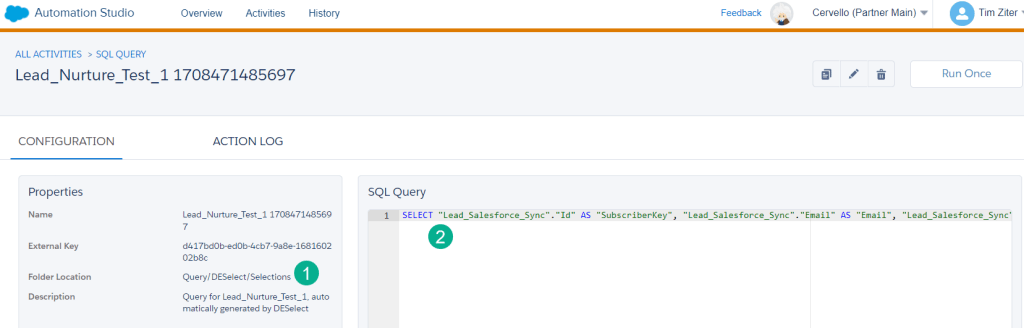
(1) DE Select will create a query in a default folder whenever you run a solution.
(2) The SQL code is there for you to learn. It’s not formatted for reading, but you can copy the code, break it down and learn how the DE Select team created that SQL magic. A great way to level up your SQL skills.
We’ve found that of all the coding languages in Marketing Cloud SQL is by far the most important. Don’t get us wrong we love Ampscript and believe it’s a must to be capable as well, but SQL is used across so many of the foundations of your marketing automation.
DESelect is a MUST to strengthen your understanding of SQL to scale and grow your Marketing Automation.
Here’s four ideas on best next steps.
1.) Reach out for a demo and free trial immediately.
2.) Sign up for one year at minimum.
3.) Join the DESelect Academy and become a DE Select Segment Expert https://academy.deselect.com/?_ga=2.96395868.1768884188.1729468073-394427647.1729464565
4.) Upskill everyone on your team leveling up the teams SQL capabilities. Host bi-weekly hands on sessions where you build different queries/segments with DESelect and evaluate the SQL that is produced.
To see the DESelect tool in action check out this video where we use DESelect to fuel an advance Lead Nurture Journey (DESelect section starts around the 12 min mark):
A big thanks to DESelect for such an amazing tool that everyone can learn and grow.
 handsonsfmc.com