We will be covering Sandesh’s presentation on SiteMap featured in the week 4 Marketing Cloud Personalization Bootcamp that is hosted and created by Jyothsna Bitra as part of the Phoenix Salesforce Marketer Group.
For more information on the Phoenix Salesforce Marketer Group please follow this link to sign up: https://trailblazercommunitygroups.com/salesforce-marketer-group-marketing-cloud-phoenix-united-states/

SiteMap General Template
Sandesh starts off with the absolute basics of any Sitemap where you:
(1) Detail Global settings that impact all pages
(2) and page level settings that impact specific pages only.
As we continue to dig into the areas of the Sitemap having a foundation of the general template will help organize the code.
SiteMap Best Practices #1: Global Menu
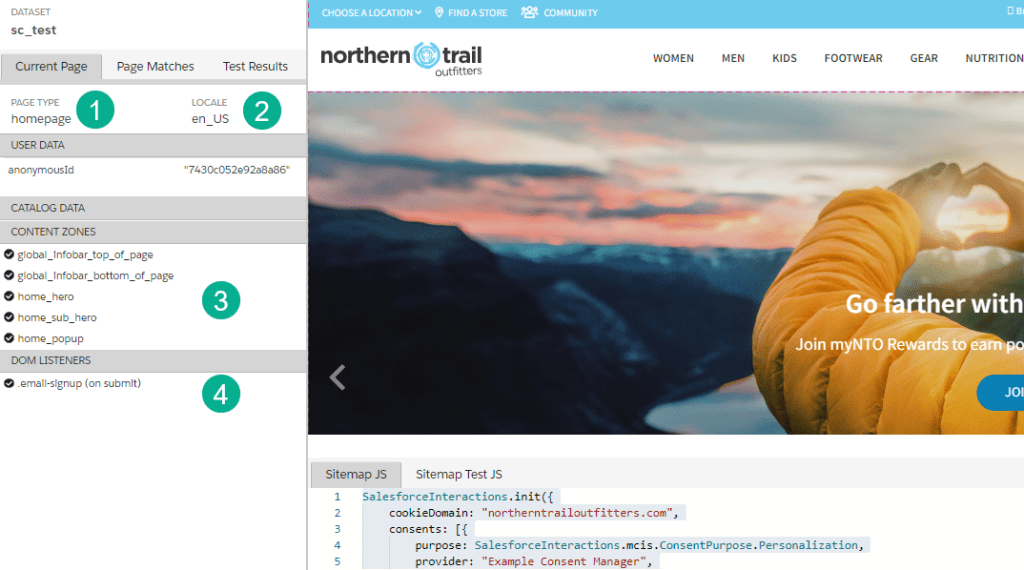
Going through the step by step process Sandesh highlights first to follow best practices and list your Content Zones (3) and Listeners (4) on the left nav so you have easy access to the key components of the site.
And at the top of the left nav you’ll see displayed the (1) page in this case homepage and (2) the locale or language.
SiteMap Key Section – Listners

Let’s follow Sandesh’s presentation as he dives into the key components of the listener syntax.

First step is to select what you are listing for, in this example it’s a “click” (1) and clicking on a specific area, the “add to cart” button on the page.
Sandesh points out that if you inspect the product detail page on the Add To Cart button you’ll see in the CSS the class “Add to Cart”.
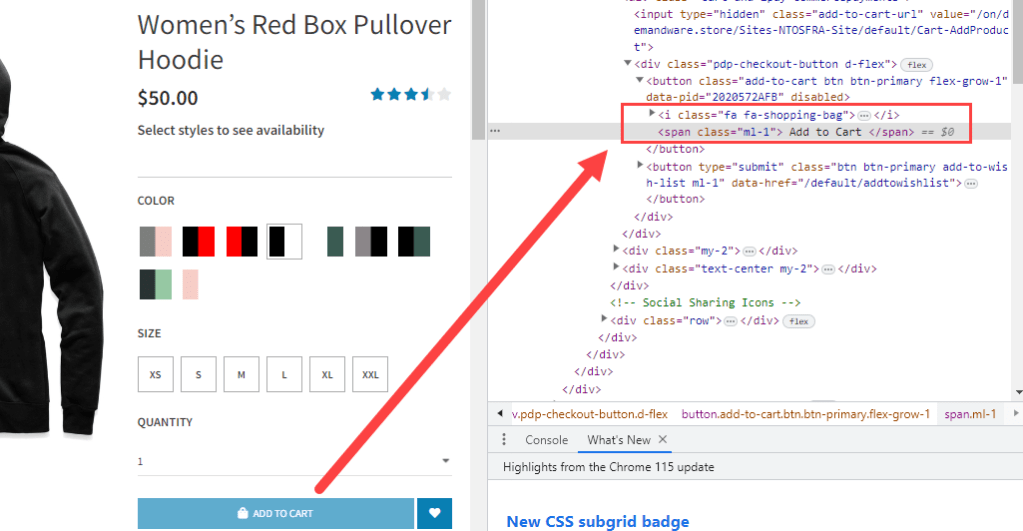
If a use clicks on that button then the rest of the code inside the curly brackets (2) will run.
Next the code sets the line item (1) selected on the page using (2) code to select the item referring to (3) the item on the page.

And lastly (1) this code sends the event to MCP with two items (2) a specific naming convention that will align with the affinity in the segment that this item was added to a cart and (3) the line item itself set above.

The key thing to note is that all listeners are set up the same way.
Enjoy the rest of the video and watch and rewatch each section as Sandesh dives into great detail. Next week we’ll be diving into the Campaigns and Templates that utilize the key aspects of the sitemap.
we’ll be covering more details on the Sitemap in future blog posts.
Sneak Peek: Templates and Campaigns
Here is a quick look at the upcoming bootcamp session on creating templates and campaigns
Creating a basic template:

(1) First select the content zone that you want to feature the custom content.
(2) MCP will provide HTML code to enable this content to be rendered
(3) Fill in your custom CSS and HTML
(4) Name your template
(5) Save and (6) Publish
Creating a basic campaign:

(1) Create a name
(2) Add a rule to define the audience to receive personalization
(3) Select Add Rule
(4) Select audience if you are using segment personalization
(5) Select the segment to personalize
Join us on 8-22 at 12 Noon EST for the bootcamp session on creating Templates and Campaigns. To sign up please visit: https://trailblazercommunitygroups.com/salesforce-marketer-group-marketing-cloud-phoenix-united-states/
 handsonsfmc.com