What: The WHERE is your filter to narrow down those records to the ones that matter for your use case.
Why: The WHERE gives you the ability to target specific records. In the example below we don’t want all leads, we only want those who were created in the last 24 hours.
Example:
Use Case: Cervello needs to feed newly created leads into a Lead Nurture Journey. The Journey sends emails so the entry data extension will need a subscriber key and email address. The emails would also like to be personalized displaying the first name and company of the lead.
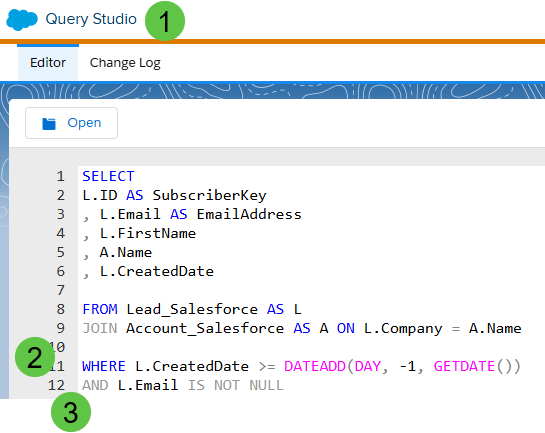
(1) A must for any SQL query work in Marketing Cloud is Query Studio. Bonus: it is free: https://appexchange.salesforce.com/appxListingDetail?listingId=a0N3A00000FP3yFUAT
(2) In the WHERE you’ll want to list the different filters. In this example I’ve got my variable L.CreatedDate which is a value on the Lead synchronized data extension. And we want to pull only those leads with a created date greater than the last 24 hours.
SQL Query: WHERE Tip #1 – Cap all Statements and Functions
When coding in SQL it’s best practice to be consistent. It can also be helpful to separate statements and functions from other code. So whenever possible use all caps.
We are using the DATEADD function to create a date in time that is 24 hours ago from the current time when this query runs. The DATEADD function has three sections: (timeframe, amount of time, current date/time)
(a) Timeframe: Choose from any different timeframe like Day, Month, Hour, Quarter, etc.
(b) Amount of time: In this case we want 24 hours of 1 day. To look back 1 day or 24 hours ago use the minus indicator.
(c) Current date/time: the GETDATE() Function is very helpful to automatically pull in the current date and time.
(3) When adding additional filters use either an AND or OR function. In this use case we want only those leads where the email address or L.Email is not empty or IS NOT NULL.
The Output:

(1) The values from the Lead Synchronized data extension are coming through as SubscriberKey and Email address not ID or Email.
(2) The name of the company or account that is coming from the Account database.
(3) At time of running the CreatedDate field validates that we are only pulling in those records that have been created in the last 24 hours.
Code to copy:
SELECT
L.ID AS SubscriberKey
, L.Email AS EmailAddress
, L.FirstName
, A.Name
FROM Lead_Salesforce AS L
JOIN Account_Salesforce AS A ON L.Company = A.Name
WHERE L.CreatedDate >= DATEADD(DAY, -1, GETDATE())
AND L.Email IS NOT NULL
WHERE L.CreatedDate >= DATEADD(DAY, -1, GETDATE())
Advanced functions in the WHERE statement: to be filled in later WIP
Links to Functions mentioned in this page:
| Function | Link |
| SELECT | https://handsonsfmc.com/how-to-sql-marketing-cloud-select/ |
| FROM | https://handsonsfmc.com/how-to-sql-marketing-cloud-from/ |
| JOIN | https://handsonsfmc.com/how-to-sql-marketing-cloud-join/ |
| AS | Work in progress, will add soon |
| ON | Work in progress, will add soon |
| DATEADD | Work in progress, will add soon |
| GETDATE | Work in progress, will add soon |
 handsonsfmc.com