If you missed our second HandsOn session this week here’s the video and recap with commentary from the team.
Here’s an overview of the session:
Builder: Barkha Mishra – Thank you Barkha for participating and building with us!
Topic: Cleaning up code and customizing personalization displaying only first name.
Ampscript Functions used: Substring, IndexOf, Subtract, IF/THEN
Use Case: The Northern Trail Outfitters creative team has built their welcome email with some cool ampscript but are having challenges displaying the greeting consistently. The desired output is to display the first name of the loyalty member. One data source displays it correctly while the other data source displays first and last name.
Before we dive into how Barkha built out the solution let’s review some overall coding best practices or approaches:
Part I: Code clean up
Our first HandsOn session was a fast and furious build so we didn’t focus on overall code formatting in content builder. Here’s a couple of key points that might be helpful in establishing standardized formatting with your team.
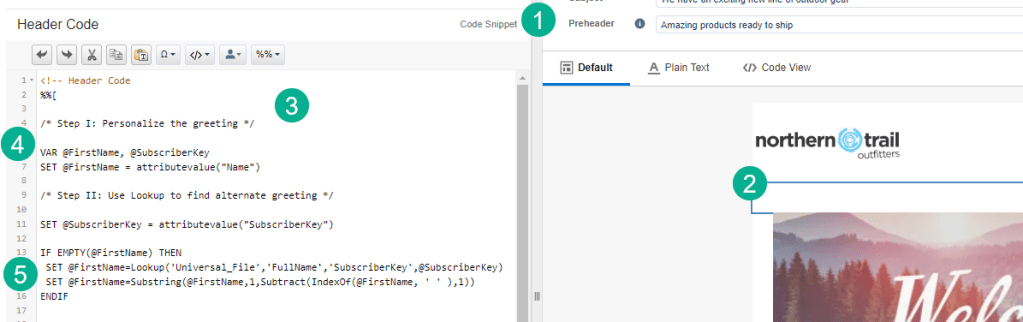
(1) and (2) We’ve seen it be successful if you add a Code Snippet block near the top of your email to contain as much of your ampscript coding as possible. This has the following benefits:
a) Easier to support – all of your ampscript code will be located in one place instead of scattered around in various content blocks.
b) Keeps code pure – Some blocks like Free Form blocks can alter code so that it conforms with the WIZIWIG. this won’t happen to the code in a Code Snippet block.
c) Recommended by Salesforce – Salesforce recommends to capture as much ampscript in Code Snippet blocks to guarantee best results.
In the video you will see how this code snippet looked before and steps 3-5 cover a few recommended formatting improvements:
(3) Clean up as much black space as possible.
(4) We prefer using all caps on functions like VAR, SET, IF, THEN, etc but this is completely up to each team as long as it’s relatively consistent.
(5) It helps to indent any code within an IF/THEN statement as it will help underline what functions are included in each IF/THEN especially when you have nested IF/THEN statements.
Part II Substring to display only first name
Now that we have a clean coding environment to work in Barkha will code to solve our use case which is displaying only the first name of a data point.
In our example we have a data point that is displaying Patty Carlson for the greeting.
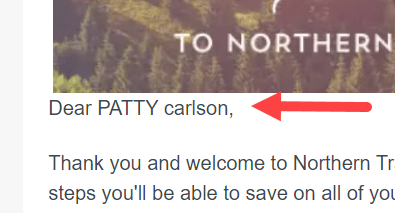
To solve this let’s take a look at the Substring function on the Salesforce Ampscript function reference guide: https://developer.salesforce.com/docs/marketing/marketing-cloud/guide/Substring.html
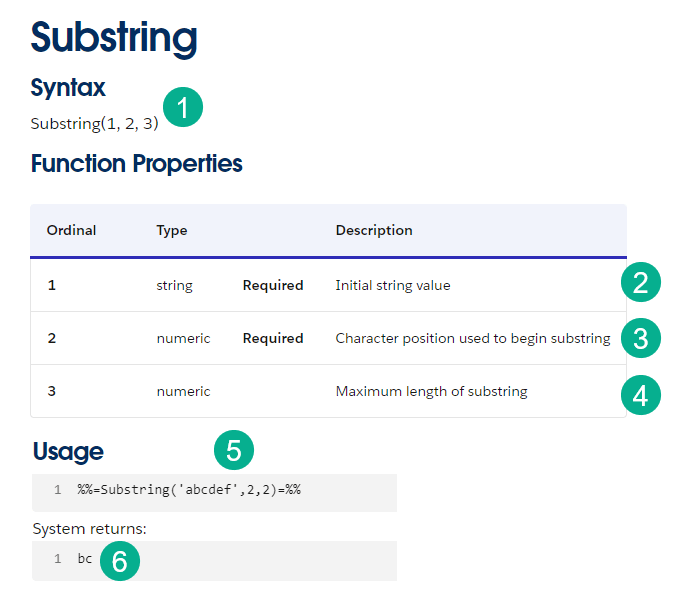
(1) There are three variables needed to complete this function.
(2) Variable #1 is the value that you are looking to trim, in our case it would be the variable that contains: Patty Carlson
(3) The starting position for what needs to be returned. In our case it would be 1 as we want to pull out the first name.
(4) The maximum length of the value to be displayed. This value is a bit tricky as it will vary for each name.
(5) An excellent example provided by Salesforce. Here our variable is ‘abcdef’, it will display starting on line 2 or ‘b’ and the length of what will be displayed is two.
(6) The end result is the displaying of ‘bc’.
Dropping this function into our code snippet block:

(1) First we need to set a variable to the output of the Substring function. In this case we can use the @Firstname as an additional variable isn’t needed and it will allow us to keep the universal greeting variable the same.
(2) The first variable of the Substring function will be the @FirstName variable.
(3) The second variable is easy as we want to start in position #1, the beginning of the first name.
(4) The maximum length of the variable is unknown at this point and that’s were we need to look to the help of the IndexOf function.
Part III IndexOf
IndexOf is a handy function that can be used in many applications. For our use case we need to determine the position in our first name variable where the space occurs as that will indicate the end of the first name.
For example, in “Patty Carlson” the space is located in position 6. Indexof will return this value as our third value in the Substring function.
Let’s take a look at the indexOf function on the Salesforce Ampscript function reference guide: https://developer.salesforce.com/docs/marketing/marketing-cloud/guide/IndexOf.html

(1) The syntax for the function, only two variables needed
(2) Variable #1 is the text or variable to compare/evaluate
(3) The value that the function is looking to find the position in #2
(4) A great example provided by Salesforce. In this example we are looking to find the position where “love” starts in the text “You will love our product”
(5) The value returns 10, the 10th space in the text where “love” begins
Dropping this function into our code snippet block:

(1) We dropped this entire function into the space needed for the 3rd variable of Substring
(2) The first variable of IndexOf is the value we are evaluating or the first name variable that could contain “Patty Carlson”
(3) The second variable is what we are looking to find the position in the first variable which in our example is just a space which is indicated by a double quote, an actual space then another double quote.
To proof our work to this point Barkha adds this code line inside of the IF statement:

And our proof is a partial success. We are displaying just the first name, but there’s an extra space as our solution is displaying the first name with the space after it.
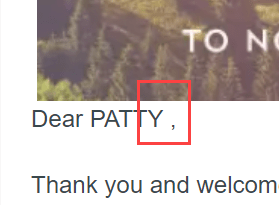
To remove this extra space Barkha will need to utilize the Subtract function.
Part IV Subract
The subtract function will do just as it says, reduce the value of a variable. In our case the maximum position for Patty Carlson that or code is outputting is not 5 which would end at the Y of Patty, but 6 which includes the space.
We need subtract to reduce our 6 to a five.
Let’s take a look at the Subtract function on the Salesforce Ampscript function reference guide: https://developer.salesforce.com/docs/marketing/marketing-cloud/guide/Subtract.html

(1) The syntax for the function, only two variables needed
(2) Variable #1 is the initial value (in our case 6)
(3) The value to subtract from Variable #1
(4) A great example provided by Salesforce. In this example we are looking to return a variable that is 20 minus 5
(5) The value returns 5
Dropping this syntax into the code Barkha ends up with the following code:

(1) The function is added as now the third variable of Substring and the IndexOf function is now nested inside of Subtract
(2) The IndexOf function is now the first variable of Subtract
(3) And since we are removing a single space, we can use the value of 1 to subtract to return the desired value in our case 5 instead of 6.
Here’s how the proof returns:
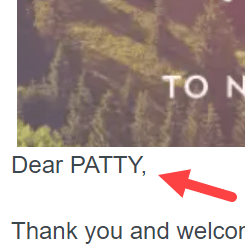
No space! Great job Barkha!
Here’s some feedback from Shonica about her first exposure to coding in Ampscript:
- Really grateful for the opportunity and the Ampscript bootcamp
- This was her first time building
- Really motivated to dig in and learn more about ampscript and Marketing Cloud
Key takeaway from this session: Spend the time
This session was a great example of how coding in Ampscript can be easy if you spend the time to understand the code, not just copy something found on a resource like stack exthange.
You could find the exact code on Stack Exchange and paste it into your solution, but that would prevent you from really understanding what the code is doing.
Please take the time to build your code methodically, understanding each step in the process and you will find greater success.
Please join us for the July 18th Hands On build where we continue to build out this use case and add more personalization including:
– Formatting the greeting using ProperCase
– Adding customized loyalty program steps
– and much more
Sign up via the Phoenix Salesforce Marketer Group to join our July 18th session at this following link: https://trailblazercommunitygroups.com/salesforce-marketer-group-marketing-cloud-phoenix-united-states/
You can sign up to build in one of our upcoming sessions at: https://handsonsfmc.com/contact/
 handsonsfmc.com