Hands On Session #2: Custom Journey Activity – Wait Until Event
Overview: Welcome to a seven part series building out the custom Wait Until Event functionality. When Marketing Cloud released this functionality in spring of 2021 we couldn’t wait to stand this up and take advantage of the functionality.
Before Wait Until Event this was our approach to On-Demand engagement from emails:
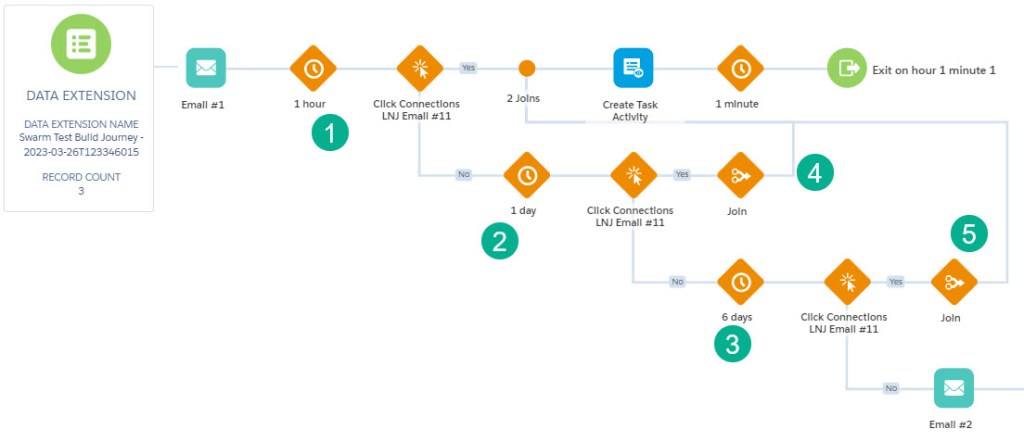
To move in those engagers immediately we had a three tiered (sometimes up to 5 tiers) Engagement Split tree (steps 1-3) where we moved on subscribers if they engaged in that all important first hour, the first day and caught any stragglers who engaged beyond that. We also had to build in several Join Activities to pull those engagers into the same path.
With Wait Until Event it is as simple as this:
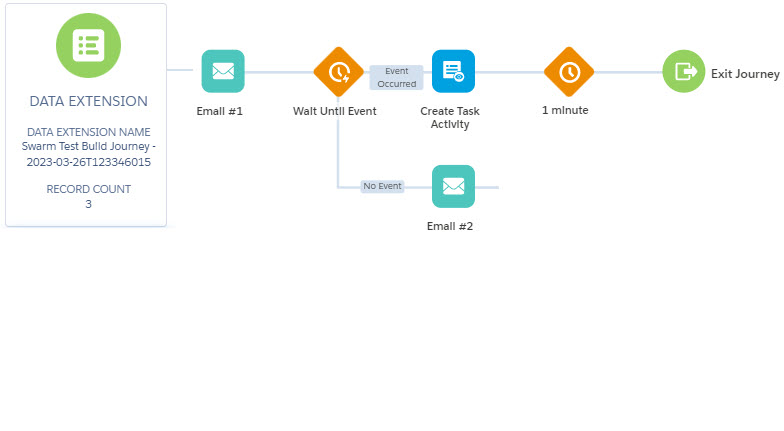
Amazing, it’s that simple. The Wait Until Event holds everyone in a bucket. As soon as a subscriber clicks on an email, whether that is minute 1 or day 7 they instantly move onto the next phase of the journey.
We’ve seen with our clients responding to engagement cut down from seven days to 2 minutes!
Marketing Cloud’s Wait Until Event for Journey builder is simply a game changer and a must for every marketing automation team.
And here’s our seven part session on how to build it from scratch!
 handsonsfmc.com