Hopefully you’ll find some helpful tips for using Automation Studio in Marketing Cloud and Salesforce.
| SQL Building Tips | Notes – Code |
| SELECT – Comma first | Walkthrough: https://www.youtube.com/watch?v=CieWsJyVh3I&t=9s |
| SELECT – How to set static values | Walkthrough: https://www.youtube.com/watch?v=CieWsJyVh3I&t=9s |
SELECT – Comma First
One of the most common errors when building SQL queries in Marketing Cloud has to do with missing commas in the SELECT statement. Here’s an example of this error:

Marketing Cloud doesn’t specify that you have a missing comma, they only point you to the area where the error is occurring. To solve this problem if after your first value in the SELECT statement you start the line with a comma as part of your typical formatting you’ll avoid these common errors. Modify the above to the following:
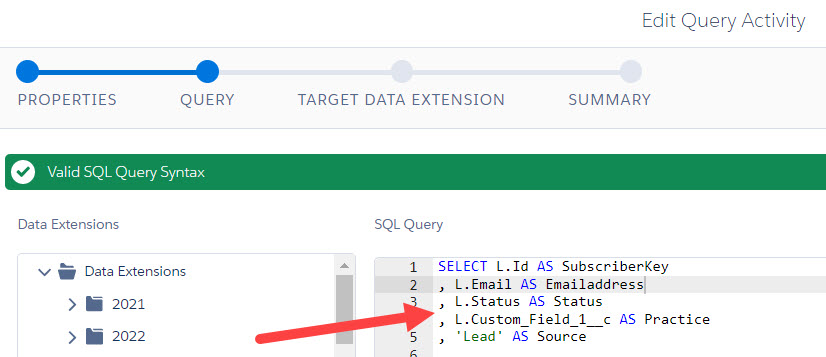
Watch the Hands On SFMC team utilize this formatting in their build at the start of the video: Marketing Cloud Lead Nurture Journey Build #3: Campaign Query – https://www.youtube.com/watch?v=CieWsJyVh3I&t=9s
SELECT – How to set Static Values
There might be situations where you need to set static values for certain fields along with the other custom variables in your SELECT statement. Utilize the “AS” function in SQL by first declaring the default value in single quotes and set it to the name of the field in the data extension.
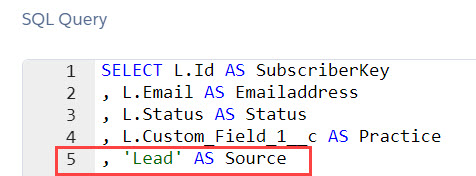
Watch the Hands On SFMC team utilize this formatting in their build at the 35 minute mark of the video: Marketing Cloud Lead Nurture Journey Build #3: Campaign Query – https://www.youtube.com/watch?v=CieWsJyVh3I&t=9s
 handsonsfmc.com