Welcome to our kick off to our weekly Hands On building sessions – the Welcome email. Over the past year we’ve been gathering interest to participate in regular Hands On building sessions. Thanks to the Phoenix Salesforce Marketers Group: https://trailblazercommunitygroups.com/salesforce-marketer-group-marketing-cloud-phoenix-united-states/ which we all recommend you joining, we’ve hosted a few Hands On sessions on their various bootcamps. To watch previous bootcamps please visit their Youtube channel: https://www.youtube.com/@MCLearningCamp
We will continue to provide Hands On sessions in support of the upcoming bootcamps throughout the year but also wanted to start a weekly Hands On series as well. So join us as we start our regular series of hands on sessions where you can learn Marketing Cloud hands on by working in a real SFMC org.
Before we dive into the prep for our first How to Learn SFMC session let’s go over a few details:
Join Us!
If you haven’t signed up for our hands on session please sign up here. https://handsonsfmc.com/contact/ Tell us what you would like to build.
Day of the week
We are thinking of conducting our Hands On sessions each week at 8am EST. If you would like to vote on the best time that works for you we might add a second session on a different day in the evening EST to accommodate others across the globe. To vote on a best time visit our Marketing Cloud Cloud Page we created for this first session: https://mcj6f75tfbrhpcl2vw02ptm-bbfm.pub.sfmc-content.com/1esiyaajuyj
Here’s the cloud page and Data Extension we built as a shell in prep for our first How to Learn SFMC session:
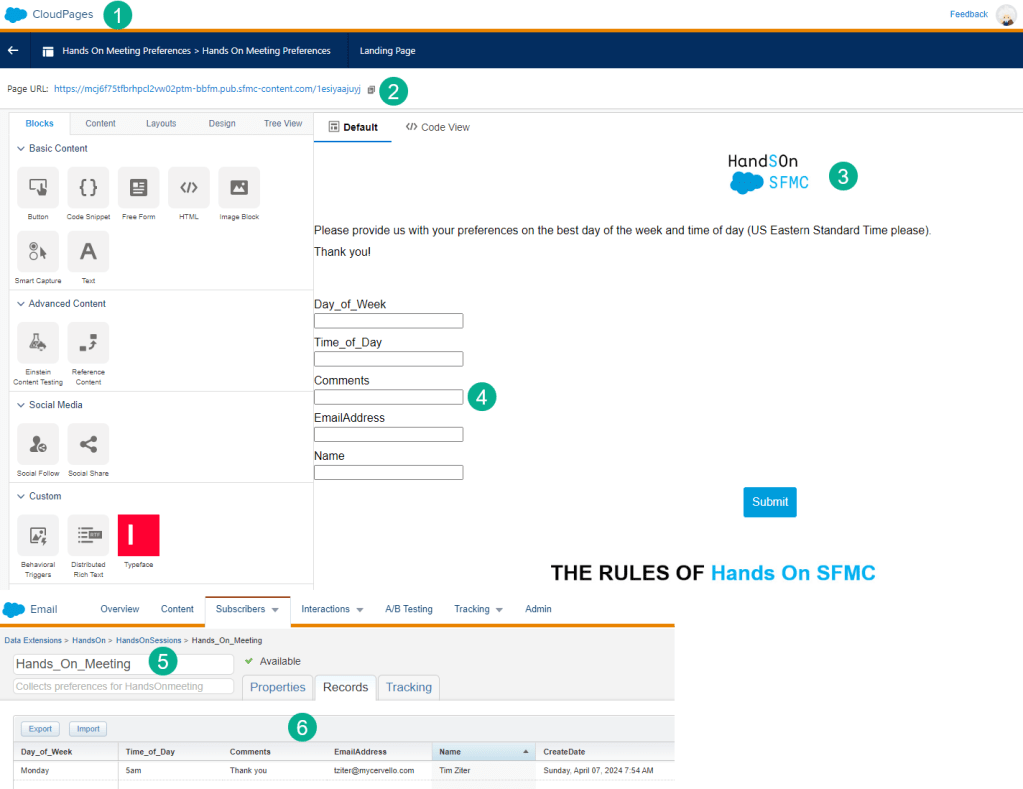
(1) This is an actual Cloud Page that gathers your responses on the best time to meet.
(2) The url for the cloud page – available once you publish
(3) We branded the page using a simple Image Block
(4) We brought over a Smart Capture block and connected it to a DE (below)
(5) We created a Hands_On_Meeting data extension to capture the responses (yours will appear in here!)
(6) And tested the form to make sure it was in working order
What to Build? First We listened to your suggestions
We gathered feedback from the 88 of you who signed up over the years and of course created a database for each sign up including details on what they would like to build.
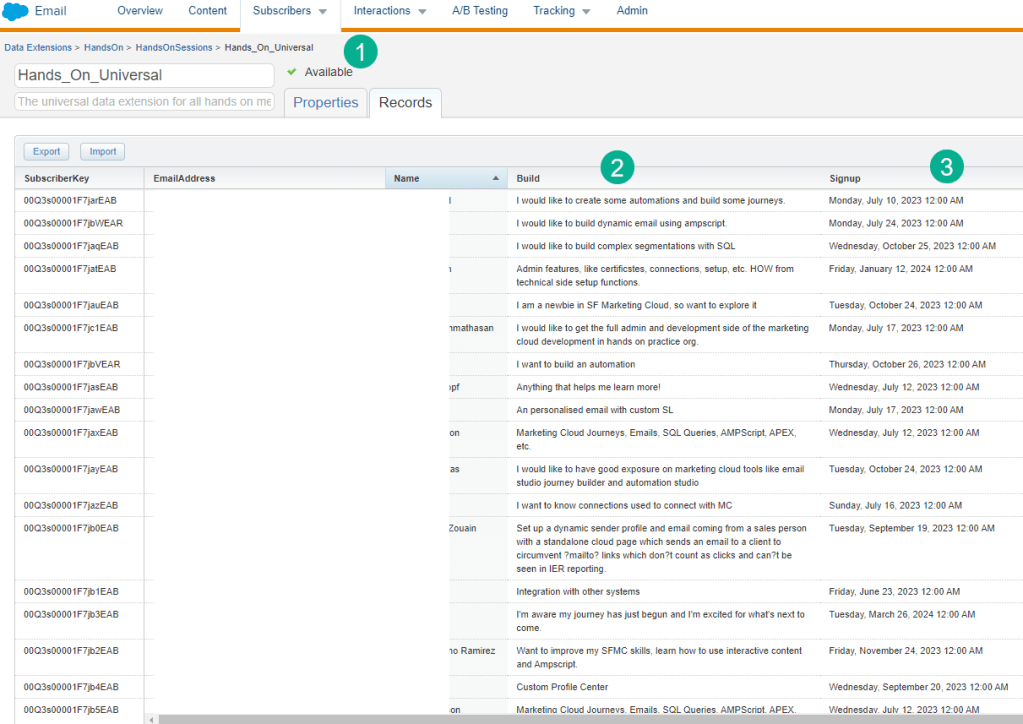
(1) We created a few data extensions with this data. This particular iteration is a Universal DE which will capture all the pertinent information on members.
(2) in the Build field we are capturing what you wanted to build
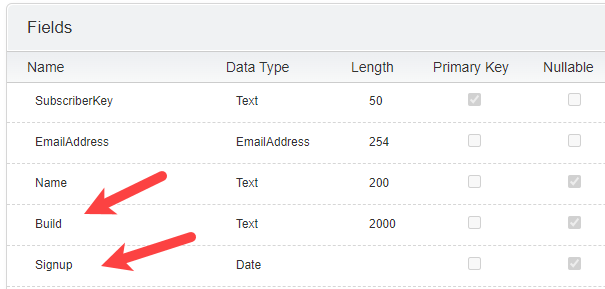
The Build field is a TEXT data type, has a max of 2,000 characters as you all added lots of comments and is nullable in case we have a sign up who didn’t add any suggestions.
(3) We captured date of sign up, which is a Date type and is also nullable but should always be populated.
What to Build – Let’s build a community!
We heard a lot of amazing suggestions including how to build Journeys, Automations, Data Extensions, Ampscript, Email, MCP and on and on which was fantastic!
Not being sure where to start we thought lets start with the use case of building a community. We’ll pivot to other topics as soon as they come up.
Let’s brainstorm on what Marketing Automation use cases could be created to support this community:
(1) Who are our members? – how to we capture sign ups? Data Extensions in SFMC!
(2) What to we capture about each member? We need email address and name to communicate, but do we use a subscriberkey like a Sales Cloud Lead ID? Do we capture their journey as a member of the community?
(3) How to we communicate with our members? We want to communicate so that we active participation in our Hands On sessions. First off how do we welcome them to the community (Job #1!) and then how do we communicate ongoing?
What We’ve Built So Far – The Welcome Email
If you signed up on HandsOnSFMC you will receive the following Welcome email that we created in our SFMC instance:
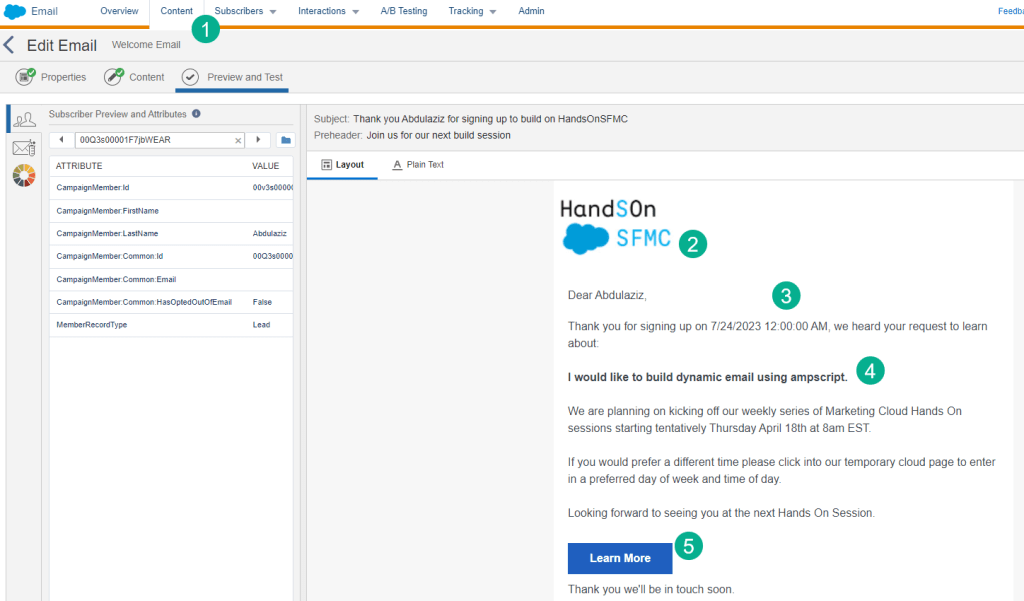
(1) Built in Content builder using an Email Design System – a Hands On session series to come later this year.
(2) Here’s our first email rough draft. We’ll plan on rebuilding this in our first series of Hands On sessions but for now it’s a start.
(3) We are personalizing this email in a variety of place including the greeting, the sign up date,
(4) and sharing what each person listed as to what they want to build.
(5) Our call to action button (color needs to align with the Hands On Blue BTW) takes you to the cloud page listed earlier in this post.
Here’s a peek under the hood of this email and how it’s using ampscript to generate the custom personalization:
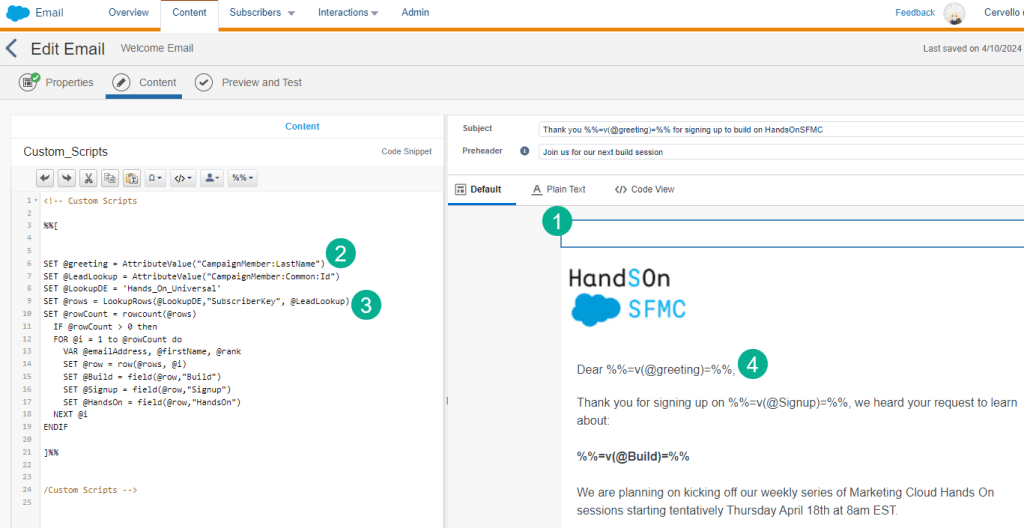
(1) We dragged over a Code Snippet block to capture our ampscript coding.
(2) Here we set variables using the attribute value function based on the values of our entry data extension. Notice the syntax of the fields as we are using a Salesforce Entry Event which SFMC creates the data extension fields automatically in a unique syntax.
(3) We’re using the amazing lookuprows function to pull in details captured in our universal data extension featured above based on the subscriber. For more details on the lookuprows function check out this blog: https://handsonsfmc.com/part-3-lookuprows-function/
(4) In the end we are displaying the variables in the body copy using the v function.
For more on ampscript please check out our Ampscript Bootcamp series: https://handsonsfmc.com/ampscript-bootcamp/
What We’ve Built So Far – The Welcome Journey
We are using Journey Builder to send our welcome email.
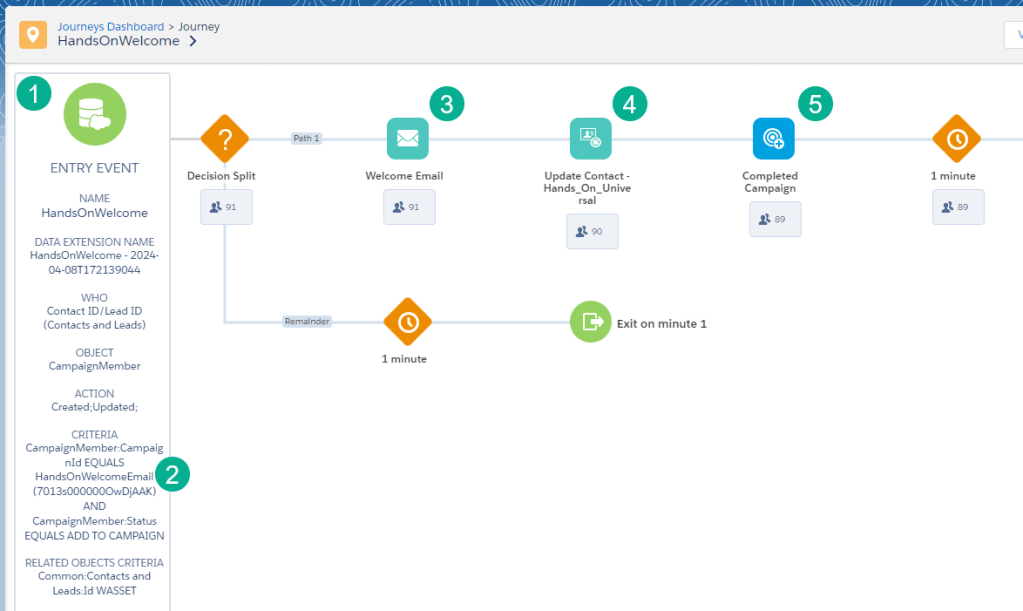
(1) We are using a Salesforce Data entry event to pull in
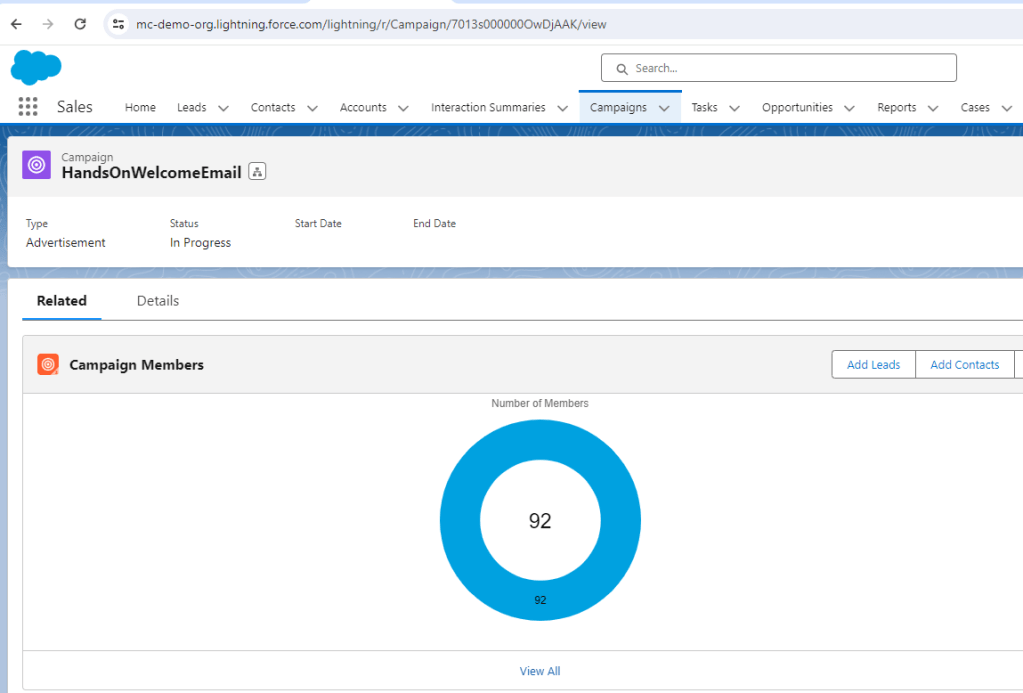
(2) Campaign members from a specific campaign we set up in Sales Cloud. When we receive a new subscriber sign up we add them as a lead in Sales Cloud and drop them into this campaign
(3) The main purpose of this journey is to send a welcome email.
(4) We are also updating our Universal Data Extension with the welcome email sent date so we can track the subscriber history.
(5) We’re updating the campaign member status in Sales Cloud to Completed Campaign for visibility in Sales Cloud.
Join us next week as we kick off our daily Hands On sessions. We will start over and build out this functionality from scratch, even determining as a team what is the best approach to send out a welcome email and communicate with subscribers.
 handsonsfmc.com
Leave a comment