The Einstein Copy Insights featured in our last blog: https://handsonsfmc.com/2024/01/21/how-to-use-einstein-generative-ai-in-marketing-cloud/ are impressive, but can be a little limited from an automation standpoint. The Gen AI copy has to be copied from the tool into the content for each personality.
Create the Content Matrix
To visualize how to automate the usage of the AI content let’s create a content matrix. The first table will be for the AI Generated Subject line. Our source for subject line via the Einstein Copy Insights:
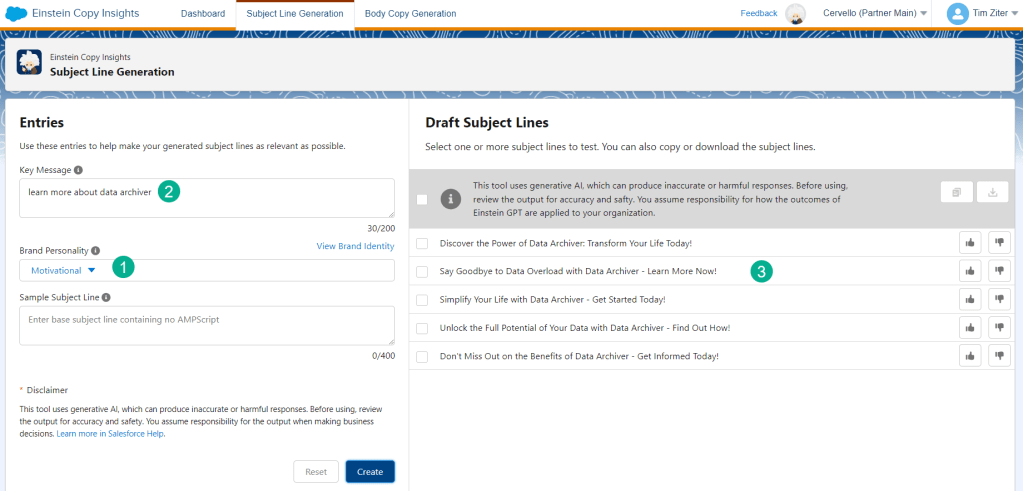
(1) First select the personality
(2) We are looking to create subject lines for our Data Archiver program
(3) Einstein creates a variety of excellent subject lines
| Personality | Version | Copy |
| Motivational | 1 | Discover the Power of Data Archiver: Transform Your Life Today! |
| Motivational | 2 | Simplify Your Life with Data Archiver: Learn More Now! |
| Motivational | 3 | Get Organized and Stay on Top with Data Archiver – Find Out How! |
| Multi-Taskers | 1 | Discover the Benefits of Data Archiver Today! |
| Multi-Taskers | 2 | Simplify Your Data Management with Data Archiver |
| Multi-Taskers | 3 | Get Organized with Data Archiver – Learn More Now! |
| Do It Yourself | 1 | Discover the Benefits of Data Archiver: Learn More Today! |
| Do It Yourself | 2 | Unlock the Power of Data Archiver: Explore Our Offerings Now |
| Do It Yourself | 3 | Expand Your Knowledge on Data Archiver: Find Out More Here |
And here’s a table for the content of the email as well using the Einstein Copy Insights Body Copy Generation AI tool:
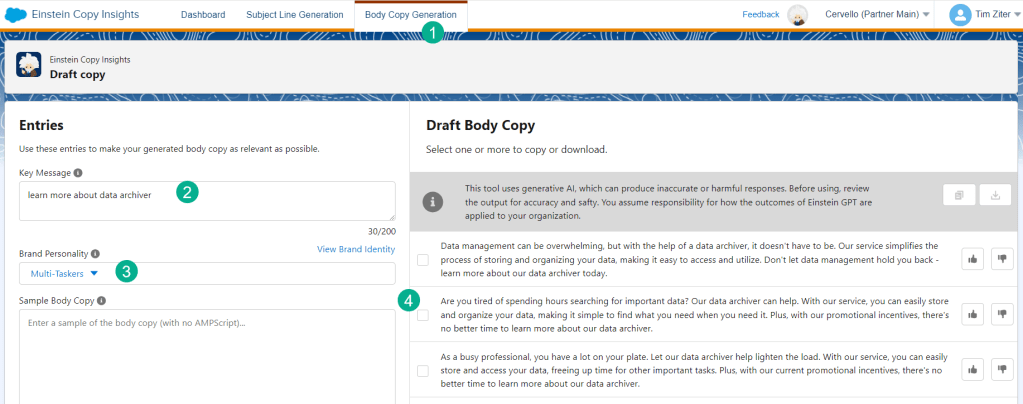
(1) Navigating to the Einstein icon in the main menu selecting the Body Copy Insights tab
(2) Entering our key message around our data archiver product
(3) Selecting our personality – in this case Multi-Taskers
(4) Einstein generates our body copy variations
Here’s how the table would come together with all three personalities:
| Personality | Version | Copy |
| Multi-Taskers | 1 | Data management can be overwhelming, but with the help of a data archiver, it doesn’t have to be. Our service simplifies the process of storing and organizing your data, making it easy to access and utilize. Don’t let data management hold you back – learn more about our data archiver today. |
| Multi-Taskers | 2 | Are you tired of spending hours searching for important data? Our data archiver can help. With our service, you can easily store and organize your data, making it simple to find what you need when you need it. Plus, with our promotional incentives, there’s no better time to learn more about our data archiver. |
| Multi-Taskers | 3 | As a busy professional, you have a lot on your plate. Let our data archiver help lighten the load. With our service, you can easily store and access your data, freeing up time for other important tasks. Plus, with our current promotional incentives, there’s no better time to learn more about our data archiver. |
| Motivational | 1 | Did you know that organizing your data can lead to a more productive and stress-free life? With our data archiver products, you can easily store and access your important files, freeing up valuable mental space and time. Take control of your digital life and learn more about our products today. |
| Motivational | 2 | Are you tired of constantly searching for important documents and files on your computer? Our data archiver products can help streamline your digital life and make finding what you need a breeze. Whether you’re a busy professional or a student, our products can benefit anyone looking to improve their organization skills. |
| Motivational | 3 | In today’s fast-paced world, time is a precious commodity. Don’t waste it searching for lost files or struggling to manage your digital clutter. Our data archiver products can help you reclaim your time and energy by providing a simple and effective way to store and organize your data. Discover the benefits for yourself and try our products today. |
| Do It Yourself | 1 | Data archiving is an essential tool for any organization that wants to manage its data effectively. With our product, you can store, manage, and retrieve your data with ease. Whether you need to archive large amounts of data or just a few files, our solution can help. Learn more about our data archiver and see how it can benefit your organization today. |
| Do It Yourself | 2 | Are you tired of dealing with data overload? Our data archiver can help you manage your data more efficiently, so you can focus on what really matters. With our solution, you can store and retrieve your data quickly and easily, without worrying about data loss or corruption. Learn more about our data archiver and see how it can make your life easier. |
| Do It Yourself | 3 | If you’re looking for a reliable and secure way to store and manage your data, look no further than our data archiver. Our solution is designed to help you store and retrieve your data quickly and easily, while keeping it safe from prying eyes. Learn more about our data archiver and see how it can help you protect your data today. |
Amazing! Thanks to Marketing Cloud’s AI Gen capabilities we have an impressive content matrix to customize our messaging to each personality as well as a/b test three different content variations. Now to the fun part, how to automate the personalization of this content on a 1-to-1 basis.
How to set up a basic Content Management System(CMS) in Marketing Cloud
We’re going to take this amazing AI Gen content and load it into Marketing Cloud data extensions to leverage the content automatically in our email via Ampscript.
Step I: Create CMS data extensions
To store the content create data extensions for the subject lines and body content:
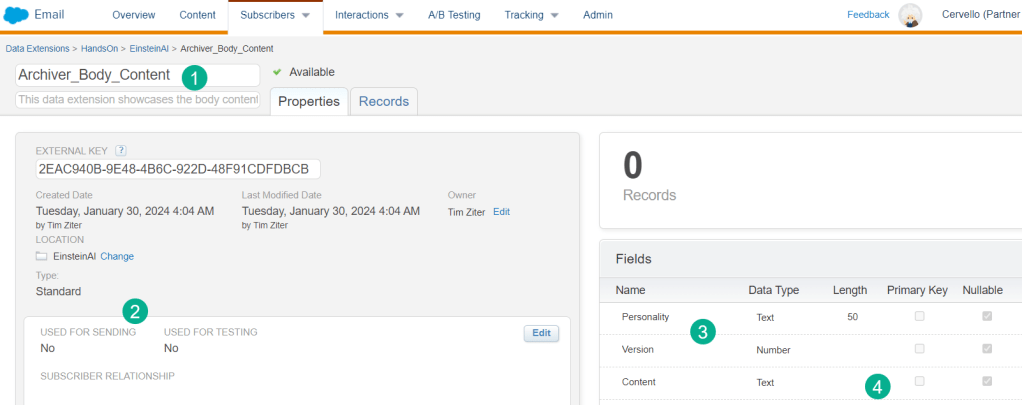
(1) Create a new data extension
Marketing Cloud Tip #1:
When creating data extensions it’s best practice to avoid using spaces. Use _ instead of spaces. This will make it easier to query the data extension name if you avoid spaces.
(2) No need to select for sending as this data extension will be a database of content not used to send an email
(3) All we need are three fields like the table above
(4) Be mindful of the length of each field in case of body content it might make sense to keep it open ended without a length.
Marketing Cloud Tip #2
Text fields can be unlimited if when you create the field you remove the default value of 50 and leave it blank.
Step II: Create a CSV file with the Content and load into the DEs
Take the content created in the table above and create a basic .CSV file in Excel.
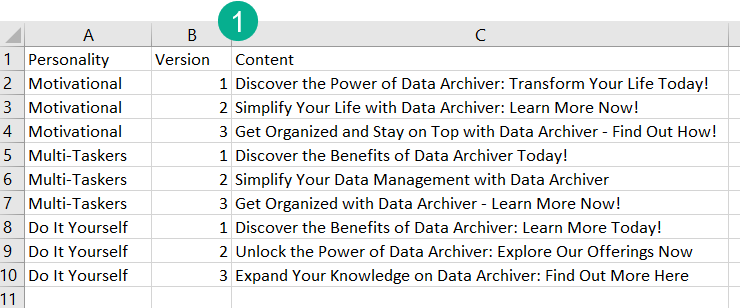
(1) Don’t forget to make sure the columns in your .CSV match the data extension fields.
Now import the csv files into the new data extensions:
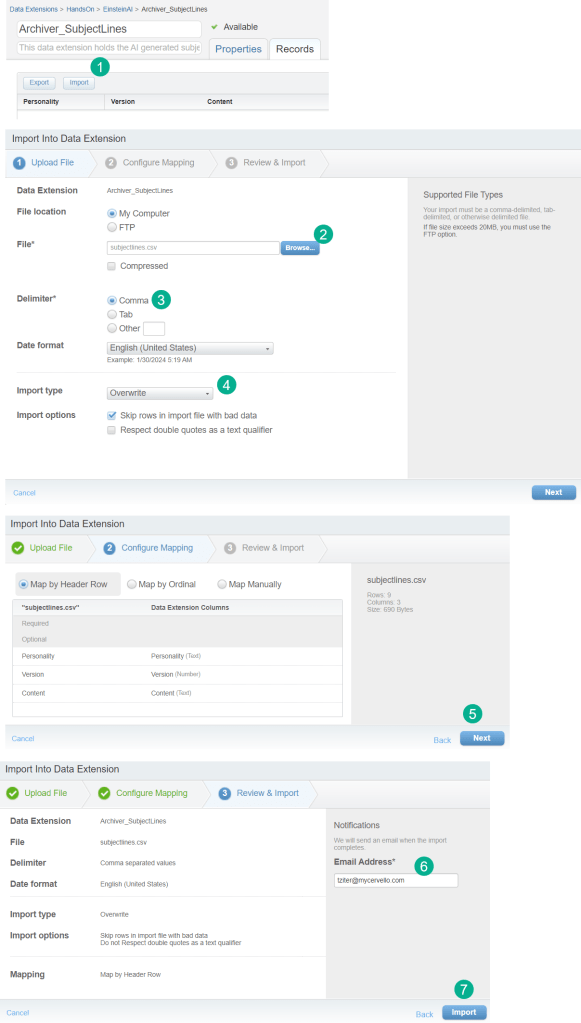
(1) Select Import to add data
(2) Select the csv file(s) created
(3) The default will be comma so leave this as is
(4) Selecting overwrite is recommended. You can also select the Respect double quotes box as well
(5) Select the Next button once you’ve confirmed the fields match and are mapping
(6) Send yourself an email notification once the data has been loaded
(7) Select import and you are done
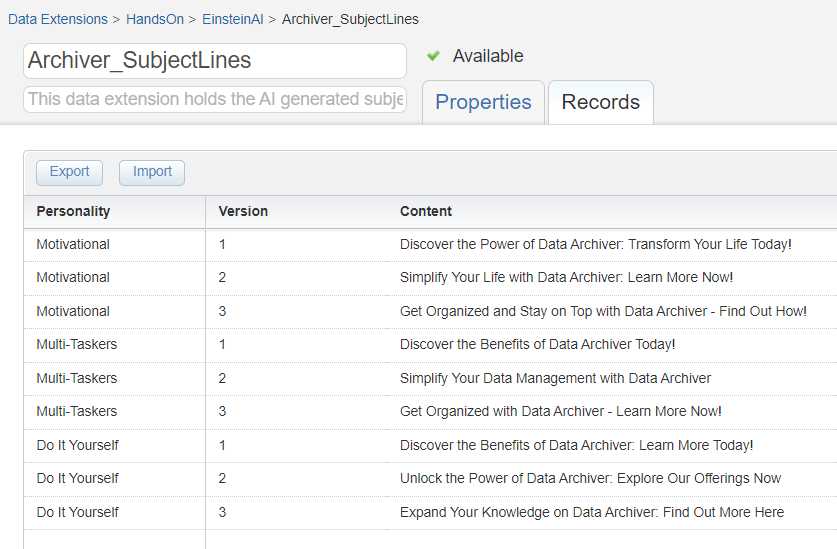
In a few minutes the data should load into your data extensions and now you have all that AI generated content at your fingertips to personalize!
Amazing! Thanks to Marketing Cloud’s AI Gen capabilities we have an impressive content matrix to customize our
Step II: Create a Email List with AI Gen Personalization Data Points
Now that we have the data loaded into Marketing Cloud where we can leverage it via ampscript, let’s create our email by first pulling in the email audience for the send.
Create the Email Send Data Extension
When thinking about how to leverage Einstein AI don’t think about just Marketing Cloud, there are amazing tools in all clouds across Salesforce to leverage. For instance in our Sales Cloud instance we are using a Large Language Model (LLM) to determine on a 1-to-1 basis the perfect personality for each lead. We’ll go over the details of our Salesforce Sales Cloud LLM in another post. For now we’ll look to leverage the AI Generated personalities in Sales Cloud that will align to the three personalities we’ve set up with Einstein in Marketing Cloud.
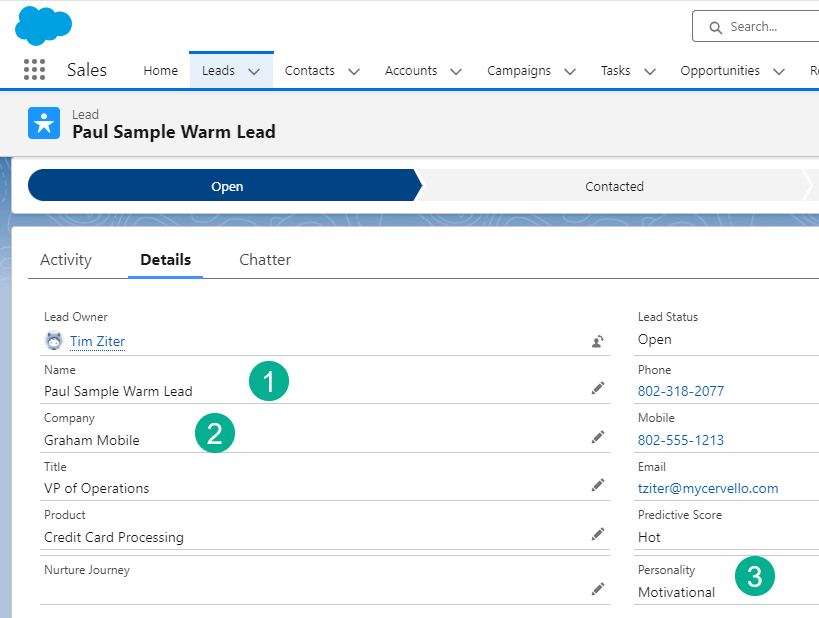
(1) Our leads contain basic personalization like Name
(2) and company name
(3) We’ve also added a custom field where we add our LLM driven personalities that tie to the Einstein Copy Insights personalities in Marketing cloud.
Create a Query to Pull in Leads
In Query studio let’s explore our dataset in Sales Cloud to create a email list in Marketing Cloud.
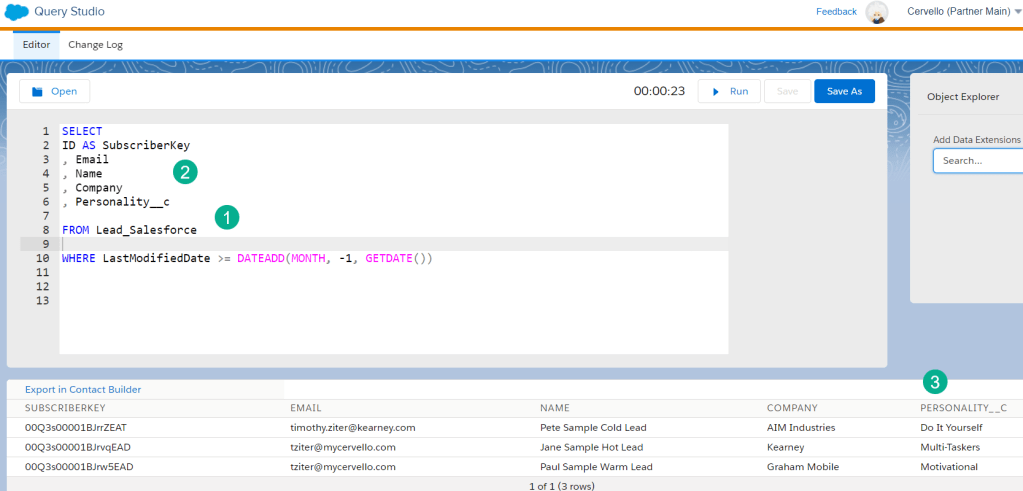
(1) Targeting the Synchronized data extension for the lead object
(2) Output the fields to a data extension to send the email and personalize the content
(3) We can see from the output the personality field that will drive the AI content in the email
Creating a query and data extension based on the code above the result is an email sendable data extension that we can use to leverage the AI content in our CMS data extensions.
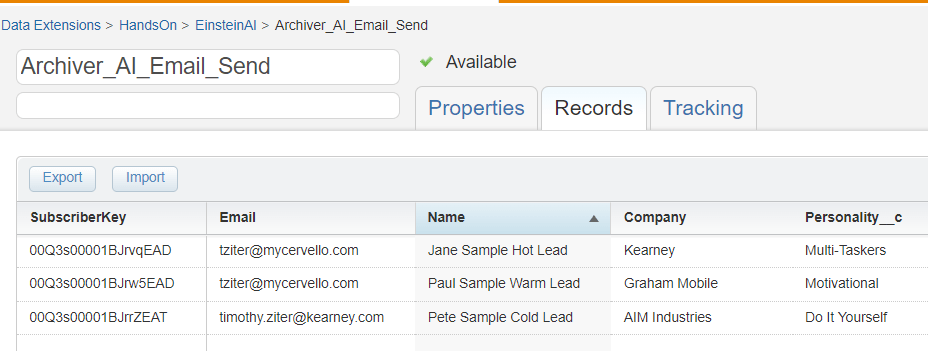
Step III: Create and send an Einstein AI Gen email!
We now have our email list to send along with the data points to hyper personalize the content. Let’s build the content to leverage those data points.
Ampscript Coding to Pull in Gen AI Content

We recommend creating a code snippet block in your email to contain ampscript coding.
(1) Set the variables based on the data points in the data extension
(2) Use the Random ampscript function to generate a random value between the numbers of 1 and 3 to do automated A/B testing of the AI Gen content. Random ampscript code details: https://ampscript.guide/random/
(3) Utilize the Lookup ampscript function to pull in the AI Gen code in the data extensions based on the Personality variable and the Random variable to select the version
(4) Utilize the same code for the body content. Lookup function in ampscript: https://ampscript.guide/lookup/
Once the variables have been set, simply output the content in the Subject Line and Body Content areas:
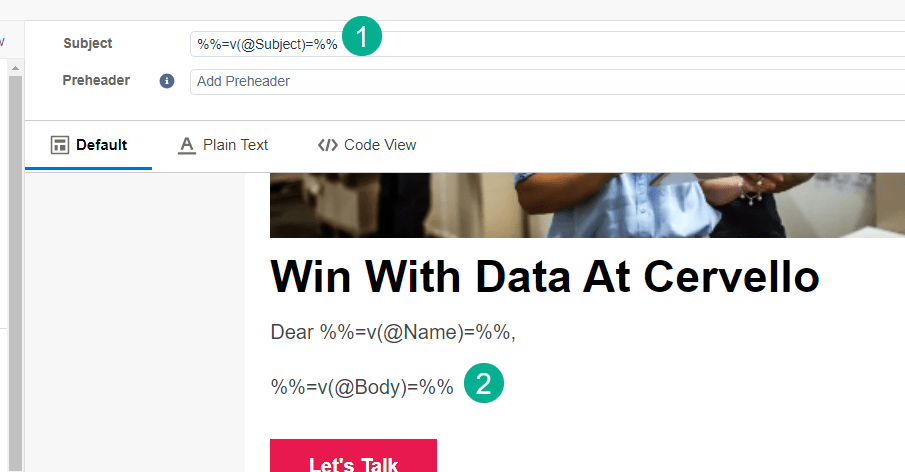
(1) use the V function in ampscript to display the variable: https://ampscript.guide/v/
(2) and the same for the body content
Finally preview the email to see the amazing AI Gen content populated in the email!
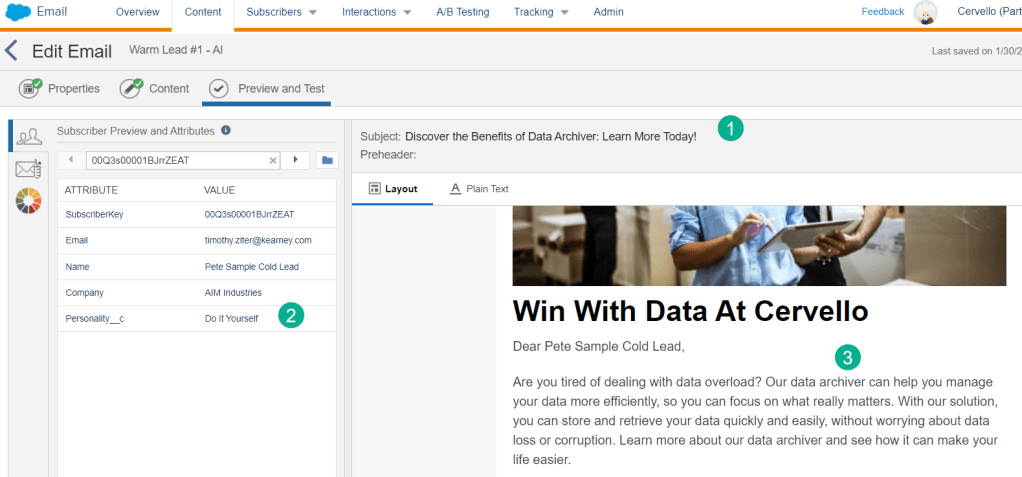
(1) Pulling in the Personality variable in the data extension
(2) Amazing! The Gen AI subject line appears
(3) And the body copy too!
Take advantage of these amazing Marketing Cloud Gen AI tools today and start personalizing your communications on a 1-to-1 basis automatically.
 handsonsfmc.com
Leave a comment