As part of the Winter ’24 release Salesforce unlocked three new Generative AI tools that you can use today to create custom 1-to-1 content in Marketing Cloud. For more information on the Winter ’24 release please read here: Marketing Cloud Einstein and Analytics Winter ’24 Release Notes (salesforce.com)
Today we’ll be covering the following two features:
– Brand Personalities: Set Up Your Brand for Einstein Generative AI (salesforce.com)
– Body Copy/Subject Line generator: Create Body Copy with Einstein Generative AI (salesforce.com)
I.How to set up Brand Personalities
Brand personalities drive the LLM (large language model) engine in Einstein by feeding distinct key words into the model. Einstein Copy Insights gives you two brand personalities out of the box and allows for the creation of ten custom brand personalities.
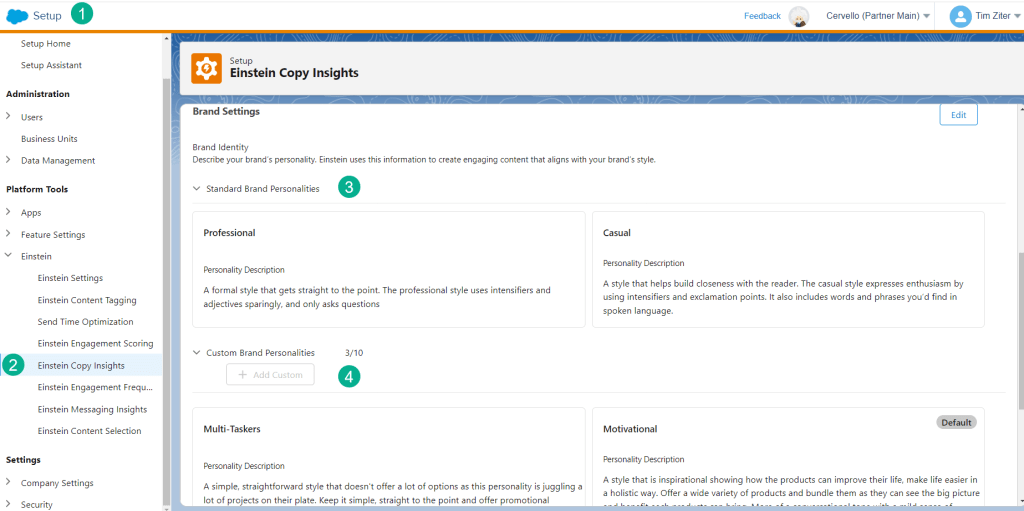
(1) Navigate to Setup
(2) Under Einstein Copy Insights
(3) Two default personalities are provided
(4) And you can create up to ten custom personalities
Brand Personality setup
Marketing Cloud won’t tell you how best to feed the LLM with your personalities, but the two default personalities give you insight into how to set them up to maximize the output.
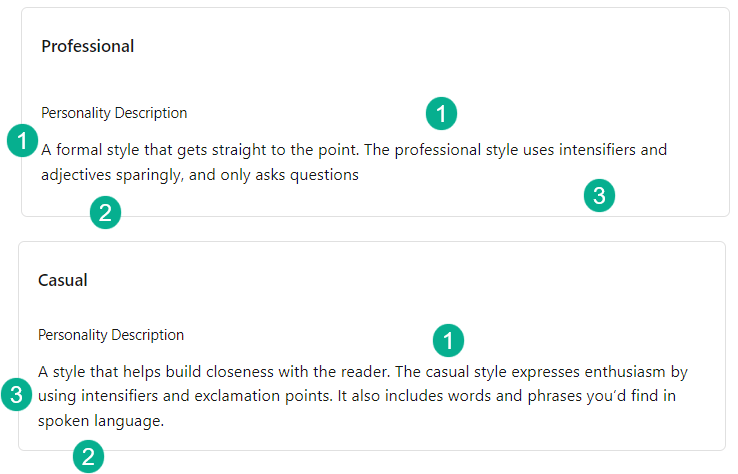
(1) Each personality references a certain type of style whether “formal/professional” or
“casual”
(2) Each personality gives clues to the types of words to be used whether using adjectives sparingly or to be more conversational
(3) You can also see similarities in that they both include intensifiers where in the Casual personality adding in exclamation points might mean a higher intensity
Take your time reviewing the default personalities and then try creating your own as you really can’t go wrong. But make sure when creating the generative AI copy/subject lines that the end result matches your intent.
Creating Custom Brand Personalities
This is where the fun begins. Hopefully with your brand you might have a few personas created based on the key segments of your business. In our example today we are using the following three personas/personalities:
(1) Multi-Taskers – Multi-taskers are juggling a lot of things in their life. They are passionate about each of their areas of focus, but that focus can switch one day to the next. The messaging needs to be simple and promotional so that these potential buyers act now before their interest fizzles
(2) Motivational – Motivational buyers are aspirational, they are driven to learn more about the product and will spend the time to not only consider one but a multitude of products. Urgency might not be key as they are interested in spending the time, more interest in guiding them to making the best decision.
(3) Do It Yourself – DIYers want to learn and decide on their own. They don’t want promotional prompting and would rather be left alone to discover and explore on their own.
Here’s how these personas could play out as personalities in Einstein Copy Insights:

(1) Carrying over the usage of style text from the default personalities try to differentiate each personality so either a “straightforward” style for Multi-Taskers or “inspirational” style for Motivational or “informational” for DIYers
(2) And use those keywords throughout the personality to help guide the LLM to the right language using words like “simple, promotional” for Multi-Taskers or “mile sense of urgency” for Motivational or “less pushy” for DIYers
With these personalities set up now you can generate the body copy and subject lines using the Generative AI tools in the Einstein section of the main Marketing Cloud platform.
II. How to create Gen AI Subject Lines and Body Content
Navigate to the Einstein Copy Insights section of the home page
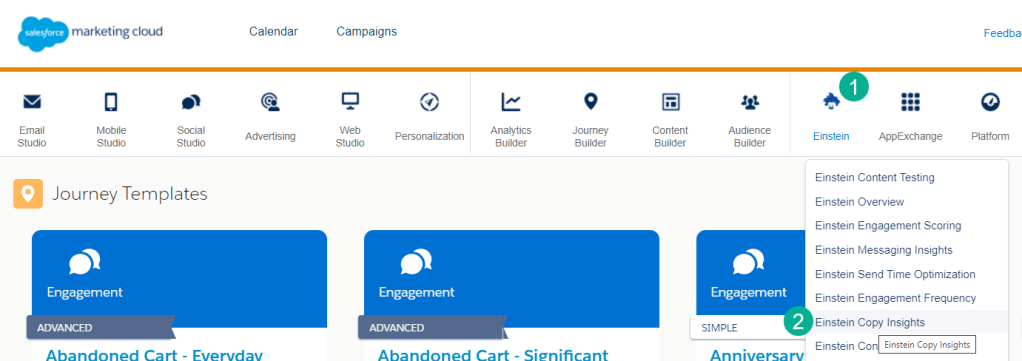
(1) Under the Einstein icon
(2) Select Einstein Copy Insights
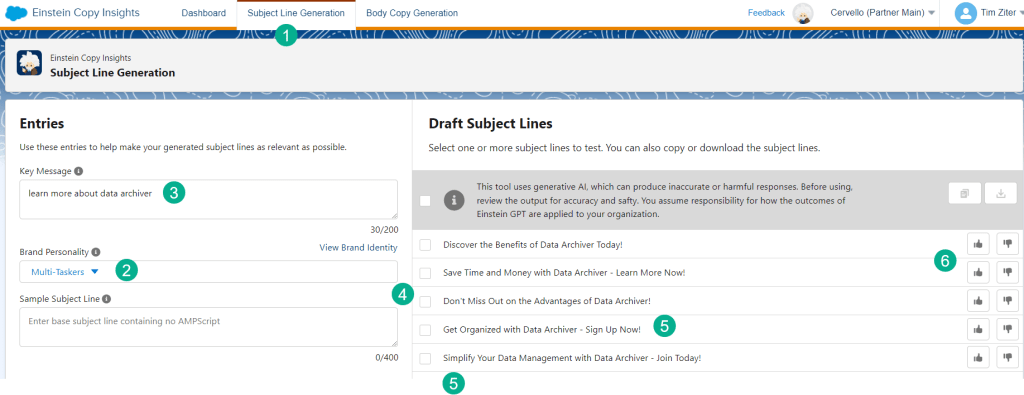
(1) For our use case we’ll explore the Subject Line generator first
(2) Select your brand personality
(3) Enter in the messaging of the communication
(4) Einstein Gen AI will generate five potential subject lines
(5) Based on Multi-Taskers personality the copy is tailored with words like “simplify” to help focus the customer and “Sign-up Now!” to drive home the sense of urgency before they lose interest.
(6) Make sure when doing A/B testing to come back to Einstein and update how each subject line performed with either a thumbs up or down. Einstein will learn from this feedback and serve up content based on this feedback.
Just to check on the functionality of the model, here’s the same content but for the DIY persona
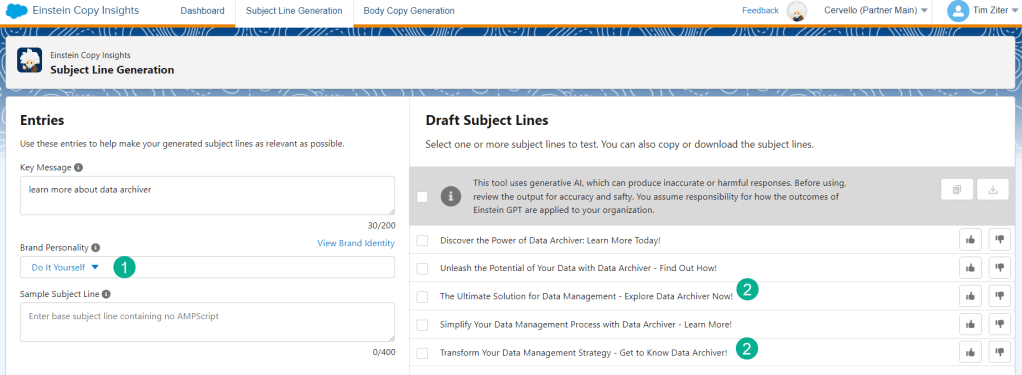
(1) Select the DIY persona
(2) The wording of these subject lines are different than for Multi-taskers with less urgency and more informational text
How to create Generative AI body content
Body copy works exactly the same way as the subject line functionality:
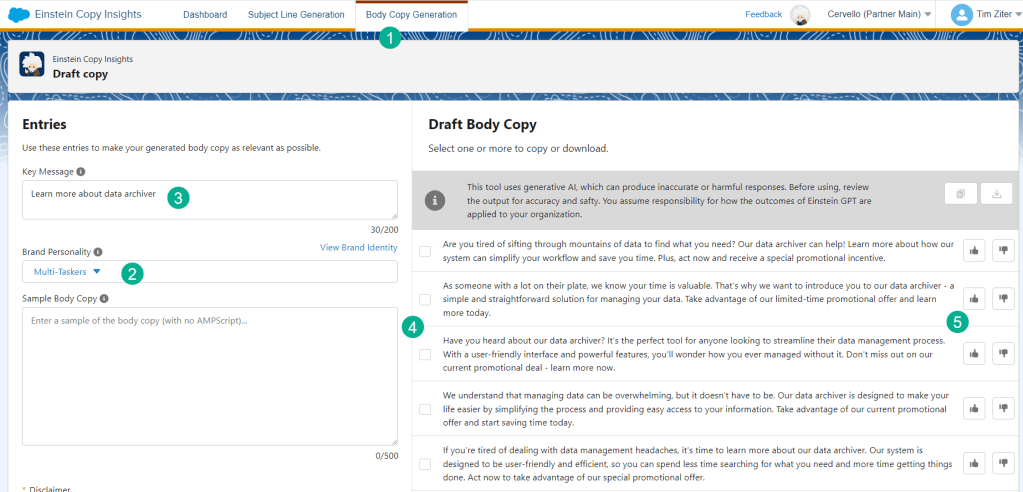
(1) Select Body Copy Generation
(2) Select the Personality
(3) Enter in the messaging
(4) Five different copy blocks are generated with similar key words depending on the personality
(5) Vote up or down for each content piece to feed the model to be smarter
Take advantage of these amazing Generative AI tools recently available in Marketing Cloud. In future blogs we’ll cover how to leverage this content in Content Builder automatically generating the content for email communications as well as review additional AI functionality.
 handsonsfmc.com
Leave a comment