To celebrate our 50th blog post on HandsonSFMC here’s part One of our 50 Marketing Cloud tips. We tried to cover overall tips and then focus on key areas of the platform. Please provide feedback or comments as we’d love to hear your tips as well.
1.) Never stop learning
Marketing Automation and the Marketing Cloud platform has endless opportunities to learn no matter what stage you are in your career and experience level. Never stop learning and challenging yourself to learn more even when there are obstacles, like not having access to an SFMC environment. There’s always ways like using cool tools like MC Snippets: https://mcsnippets.herokuapp.com/ to get familiar with Marketing Cloud or building your own email program in whatever email platform is available to you.
2.) Leverage the SFMC community
The Marketing Cloud community is wide and deep and many resources and individuals will make this tips list. If you are working through a problem and hitting blockers, reach out to the community to help find that answer. More often you’ll find a member of the community who’s encountered the very same issue and took the time to publish the answer on their own website or community board.
3.) Own your code
Follow tip #2 but don’t just copy the answer from the community without breaking it down line by line to understand how they arrived at the solution. It’s best to not even copy the code into your environment, instead copy it into a notepad, customize the code for your own use case line by line and then move it over. To help you own the code try teaching another person a walkthrough of the functionality and stand up at least one variation of the use case.
4.) Don’t be afraid of HTML, SQL, Ampscript and SSJS
These are the big four coding languages in Marketing Cloud and the coding can get quite complex especially if you have a more functional background. Mature environments will lean on the basic functionality of all four code platforms not the more advanced and complicated functionality. Focus on the basic functionality in all four platforms.
5.) Avoid use email as the Subscriber Key
If possible utilize a contact or lead id as the subscriber key instead of the email address. Not using the email as the subscriber key allows for more flexibility for the subscriber. For example you might have a subscriber exist both as a contact and a lead. Some organizations will treat existing customers this way in that they are a contact for their existing products, but a lead might be created as sales works the customer to expand their product set. If email address was the subscriber key it prevents multiple subscribers for a single email address.
6.) Be Mindful when setting Subscriber Keys
Be mindful of how you are setting and using the subscriber key in Marketing Cloud. If not used correctly you could be generating dozens of subscribers for each email address in Marketing Cloud. We’ve seen cases where the subscriber key was the name of the data extension which changed daily. The result was dozens of duplicate subscribers for each email address which diluted the performance of the subscriber and resulted in costly charges as Salesforce charges you by the subscriber.
7.) Make the most out of the Phoenix Marketers Group
Jyothsna Bitra’s Marketers Group(https://trailblazercommunitygroups.com/salesforce-marketer-group-marketing-cloud-phoenix-united-states/) is our top favorite resource because she always has amazing learning events each week like bootcamps featuring industry leading experts. Plus all of her sessions are recorded on YouTube: https://www.youtube.com/@MCLearningCamp/videos . Sign up and be proactive by attending and practicing the amazing tips that Jyothsna provides.
8.) Subscribe to The Ampscript Guide
To leverage the full power of the most amazing Marketing Cloud guide, The Ampscript guide: https://ampscript.guide/ and to do your part to thank Eliot Harper and Adam Spriggs, purchase an annual subscription and get the book. We utilize The Ampscript Guide daily for countless functions and are always pleased with the clear explanations of each function as well as high quality code examples.
9.) Invest in a TEST SFMC instance
To test in Marketing Cloud it requires either leveraging a separate business unit or a completely new instance of Marketing cloud. And migrating or pushing test assets to production is clunky as best, but the effort is well worth the current challenges. Marketing Cloud is a very controllable platform which can make testing in production doable, but nothing beats being able to full test E2E in a separate environment especially if it’s connected to Sales or other Salesforce clouds and synching data.
10.) Be a Developer in Marketing Cloud
You don’t need to be a developer or have years of experience in coding languages to be skilled in HTML, Ampscript, SQL and SSJS in Marketing cloud. Sometimes those functional roles can be the best coders because they understand the goal of the use case and leverage the code to creatively explore outcomes. If you can’t afford a developer in your environment don’t be afraid to dig in and become a coder yourself.
11.) Get Query Studio asap!
Want to become better at SQL? Get the handiest, free tool in Marketing Cloud that will allow you to query and experiment slicing and dicing your data at ease. It’s fast, it saves you from creating endless queries and data extensions and it’s FREE. https://appexchange.salesforce.com/appxListingDetail?listingId=a0N3A00000FP3yFUAT
12.) Avoid naming Data Extensions with spaces
It’s a simple tip that can save you issues down the road by using underscores instead of spaces when naming your data extensions.
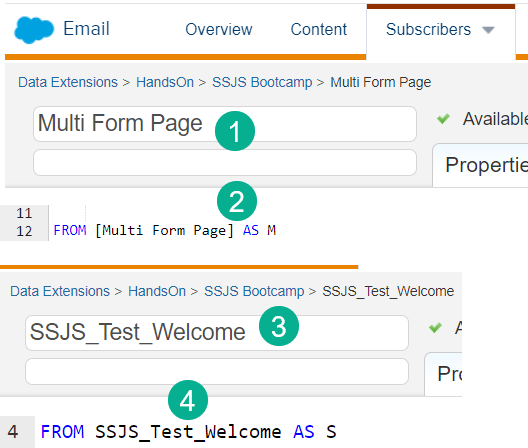
(1) If possible avoid using spaces when naming data extensions.
(2) Why? When calling the data extension in a query you’ll need to surround the DE name in [ ].
(3) Use underscores instead.
(4) and no brackets required needed.
13.) Leverage Mateusz Dabrowski’s amazing site – Must Do: SQL Basics
Mateusz makes this list twice because he does so much for the community. First tip is to leverage his website: https://mateuszdabrowski.pl/docs/sql/sfmc-sql-basics/ especially the SQL Basics page to solidify your grounding in SQL.
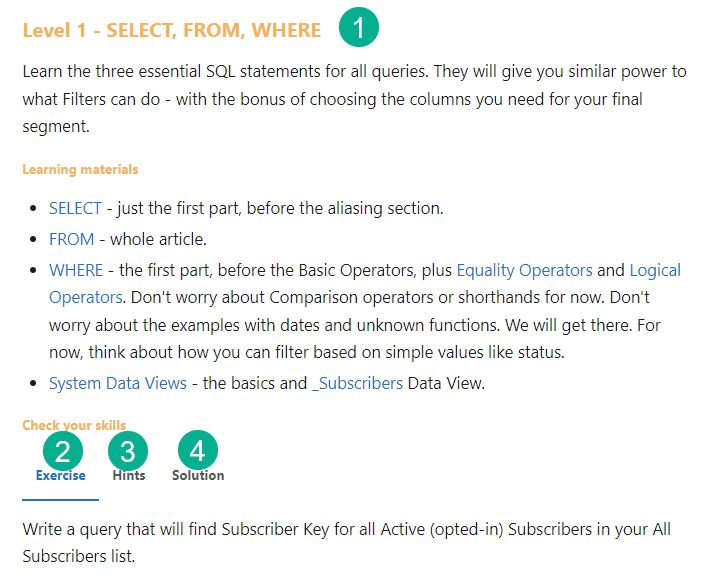
(1) Mateusz provide these amazing exercises to learn SQL from the beginning.
(2) He clearly lays out the exercise.
(3) Gives you hints to help think through each problem.
(4) And gives you the solution which you can drop right into Query Studio to validate.
14.) Every query is SELECT, FROM and WHERE
SQL can be very intimidating but every query has these three main components. Whenever you create a query always type in the SELECT, FROM and WHERE. Start from the easy part first, maybe there’s only one data source, then start with the FROM. If you have a complex WHERE or filter, build it slowly each where clause at a time. To simplify the SELECT only include those field that are necessary data points. Don’t just copy a long list of data fields.
15.) Set a default Business Unit for each user
If your environment has multiple business units, but certain users are in one BU primarily set the default BU in Settings.
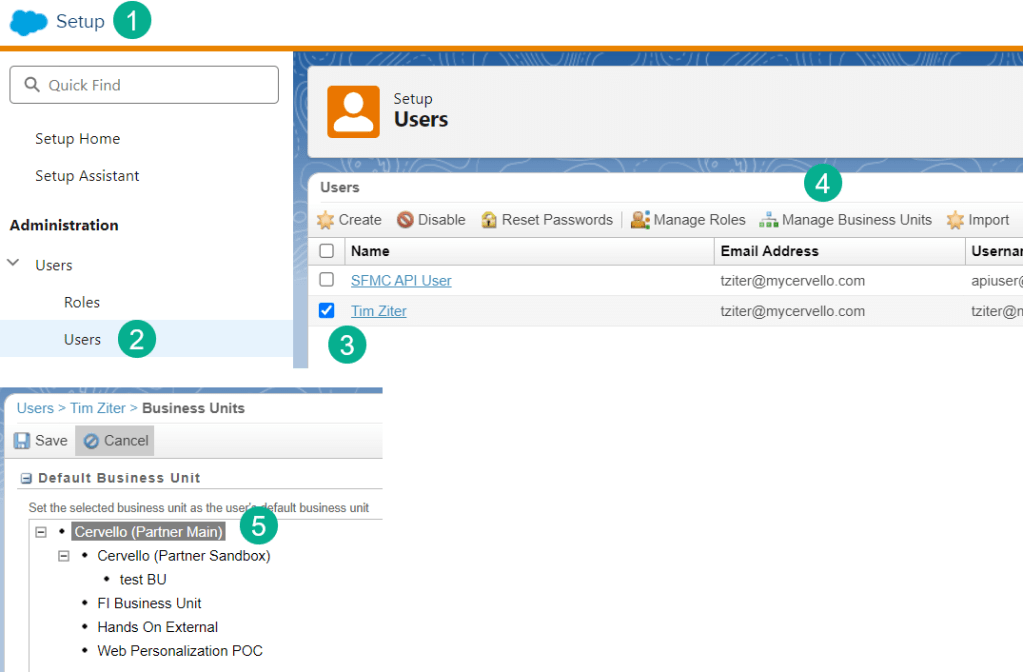
(1) Under Setup (Click on your name in the upper right corner).
(2) Select Users under Administration.
(3) Search for the users name, check the box for the user.
(4) Select Manage Business Units.
(5) click on the default business unit which will highlight in grey and click save.
16.) Create a Code Snippet Block at the top of each email to store Ampscript
Ampscript is flexible to be used inline with the HTML, but it is recommended to store as much Ampscript in a Code Snippet block near the top of the email. A Code Snippet block is preferred over a Free Form block as Content Builder won’t modify the code like it can do in a Free Form block.
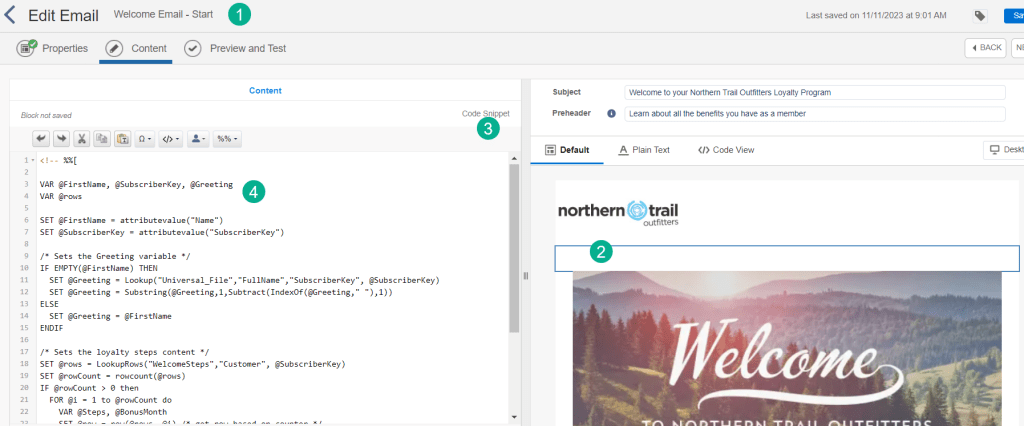
(1) When building your email in Email Studio.
(2) Drag over a Code Snippet content block near the top of the email.
(3) Verify it is a Code Snippet block vs Free Form.
(4) Place the majority of the ampscript code in the block.
17.) Variable-ize your ampscript data points
When personalizing marketing automation communications you can display data points by simply using %%datapoint%%. In a Code Snippet block set the data points as variables so that you can normalize the values and allow for more advanced personalization.
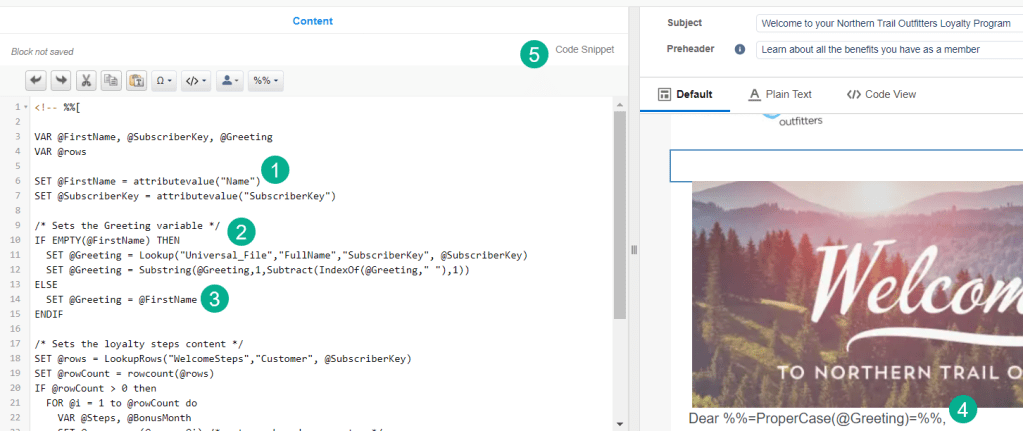
(1) Set data points as a variable using the attributevalue function: https://ampscript.guide/attributevalue/ which will normalize the data and allow the builder to leverage each variable in the solution.
(2) Use the variables in more complex functions like an IF THEN statement.
(3) Setting new variable to customize personalization points depending on different subscriber scenarios.
(4) Display the final variables in the content block using the v function: https://ampscript.guide/v/
(5) Don’t forget to use a Code Snippet block when storing ampscript.
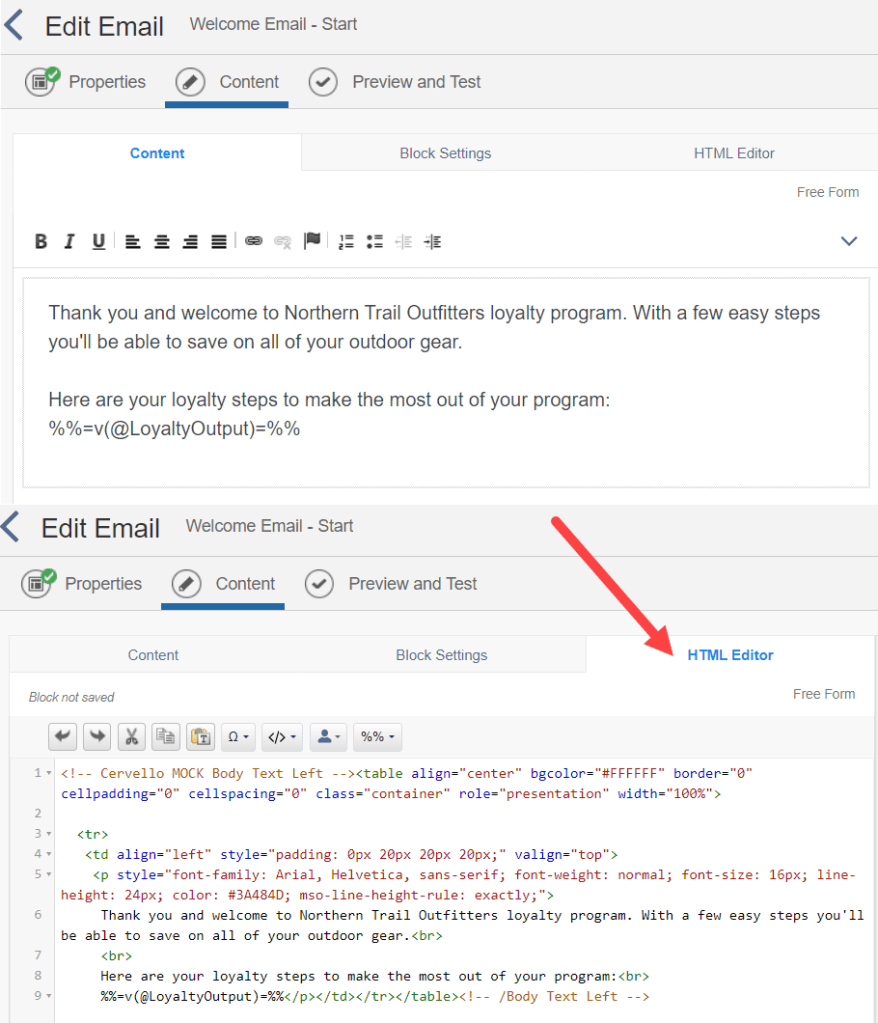
18.) When in doubt always edit/create with the HTML Editor in an email
Content builder has a fantastic Wiziwig editor in Free Form content blocks, but it can be unpredictable, add extra spacing, unwanted formatting and inconsistencies. Editing in the HTML editor guarantees accuracy. It might not be pretty, but in the long run it’s worth the extra effort to get the content right the first time.
19.) Always duplicate a piece of content that is not yours before editing it
Depending on your admin settings Marketing Cloud can automatically change the owner and date modified the second you edit a piece of content. Even if you are just looking at the code always make a duplicate of the email content and save it in a test folder before editing the document.
20.) Be mindful of all the details when setting up a Data Extension
Data Extension can be easy to set up, but the fine details of each can make or break your marketing automation. Be mindful of all those details to ensure success.
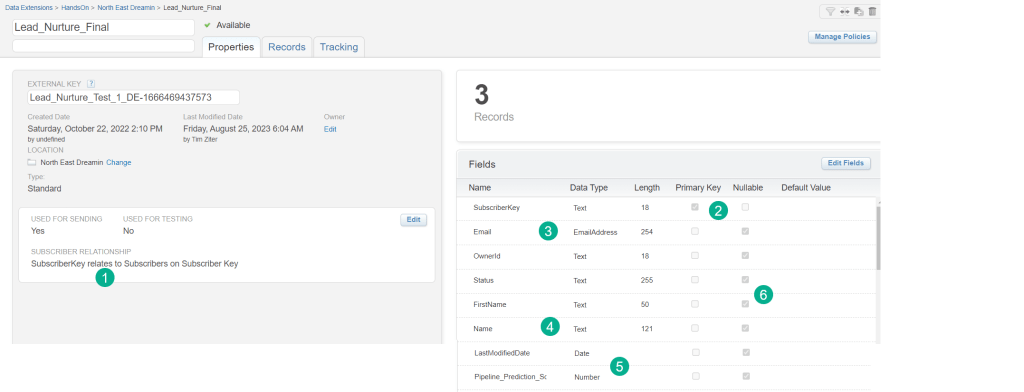
(1) Subscriber Relationship determines what All Subscribers uses to identify the subscriber key. If you select email address then email address will be the subscriber key. If you select a contact ID that data point will be the subscriber key.
(2) The Primary key identifies a unique identifier field. There can only be one record in this data extension per value in this field. A great way to prevent duplicates.
(3) There are many different data types beyond the default “Text” data type so be mindful of the best type for each field. EmailAddress for instance automatically populates at 254 length and is required type in order to be sent as the email address.
(4) Be mindful of the length of each field. In this example the Name field is longer than the FirstName field because it could contain the first, middle and last name. If your length is too short it will prevent records from being added.
(5) When using fields that are date formatted use the Date field. If you need to multiple/divide two fields make sure they are number or decimal fields.
(6) Don’t forget about nullable as it can cause problems with automations if the field isn’t selected as nullable and the record coming through doesn’t have that data point.
(7) One more not mentioned above is Default – a handy field to set the value to the field to prevent it from being blank.
21.) In SQL Select statement after the first value begin each line with a comma
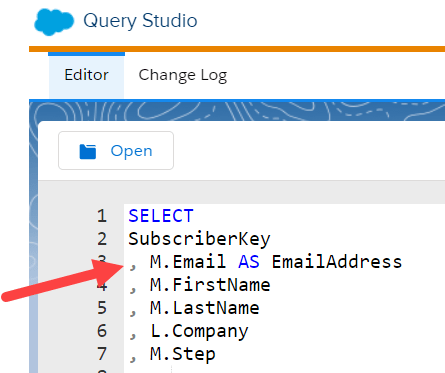
A simple formatting trick will prevent you from forgetting to add a comma after each line but the last one.
22.) Three fun tips to remember on Synchronized Data Extensions
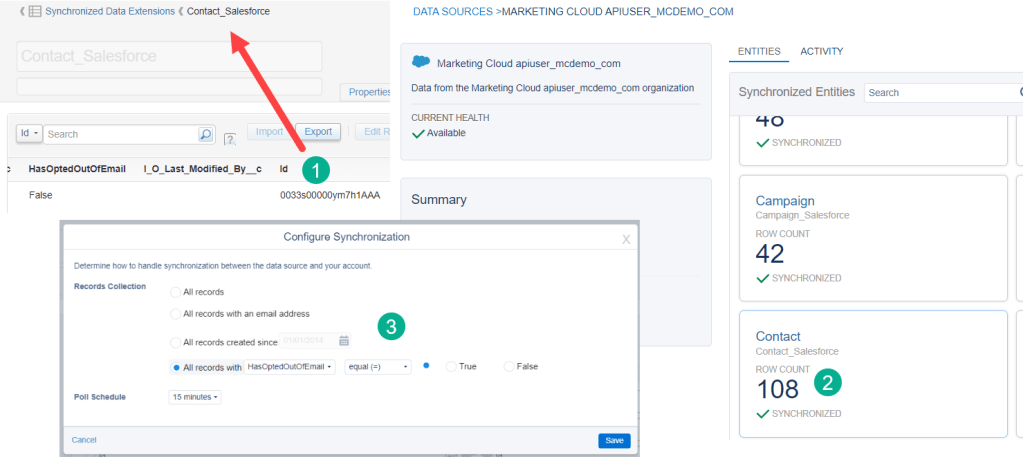
(1) The “Id” field typically contains the object ID.
(2) A maximum of 250 fields can be synched for each object. Only synch over those fields you absolutely need and keep your team informed whenever you add any new fields.
(3) There are three ways to limit the number of records that are synched over. This can be very helpful especially with Contacts as Salesforce will charge you for every contact that is synched over. Limit those that have been flagged email-able to prevent excess charges.
23.) Use a Salesforce Entry Event in Journey Builder to feed in subscribers just in time from Salesforce CRM
Whenever possible experiment using the Salesforce Data Entry Entry Event if you are pulling leads or contacts from Sales or Service Cloud. If set up correctly any record that is either created or updated in Sales/Service Cloud will instantly be brought into the Journey. Compared with the 15+ minute synch and an hourly automation you can quickly feed contacts/leads into Journeys and avoid queries and automations.
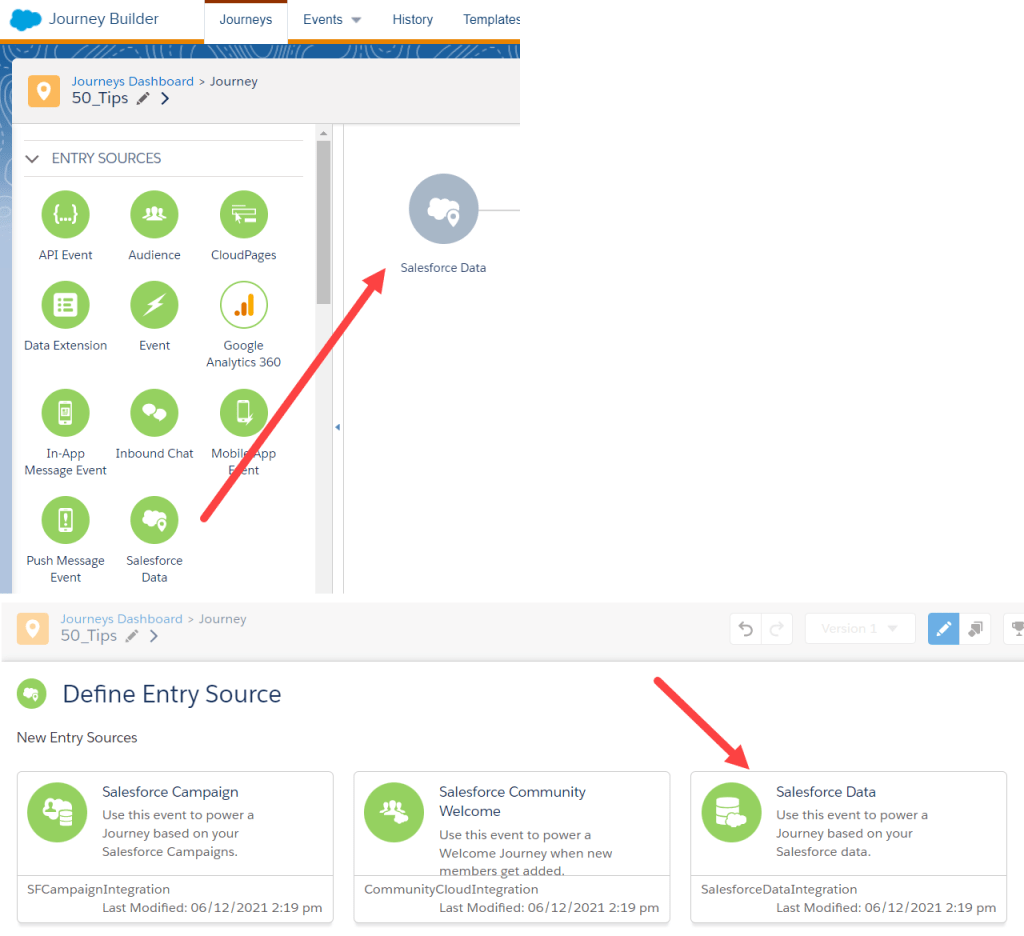
Tip: In the Define Entry Source section of the Entry Event setup always choose the Salesforce Data tile as it will give you the most options.
24.) Don’t forget to save often in Journey Builder
Journey builder will time out on you after what feels like 15 minutes where all changes aren’t saved. It’s deceiving because you can make changes, add activities, etc, but in the back end it’s not capturing the work. Unfortunately unlike content builder it doesn’t have an auto save functionality. So always remember to save after setting up each activity or when you set up a key component like an entry event.
25.) Join us for a Hands-On building session
We’ll grant you access to our sandbox Marketing Cloud environment and you will build live a marketing automation solution. Through the end of December we’ll be building out solutions showcased in the SSJS Bootcamp. Code in SSJS to build out a multi-form cloud page and a custom preference center. Sign up here: https://trailblazercommunitygroups.com/salesforce-marketer-group-marketing-cloud-phoenix-united-states/
Thank you for reading. We will publish the second half next week. Please send us any of your tips.
 handsonsfmc.com
Leave a comment