Overview – from Sales perspective
Preview=Resend is an app in Sales & Marketing Cloud that allows Sales Cloud users to preview a send-time personalized email and resend that one email right in Sales Cloud.
Let’s say you are in sales working a bunch of leads and contacts to meet your monthly quota. In a conversation with one of your contacts they comment how they didn’t receive the special email deal of the week and ask if you could send it to them. If your sales team is a little familiar with Sales Cloud they would navigate to the Contact record and find the Individual Email Results object:

(1) In Sales Cloud under any contact
(2) In the Related Tab (can vary in each Salesforce environment
(3) Navigate to the Individual Email Results related list. This has to be set up via the Marketing Cloud connector, here’s a walkthrough: https://handsonsfmc.com/how-to-setup-marketing-cloud-connect/
(4) Select the email that needs to be resent
What they will see in the Individual Email Results object is less than optimal. (1) The email which appears in the thumbnail at the bottom of the screen may or may not be there and can be very small. And (2) The email won’t display the “send-time” personalization, it will display the ampscript code only. That is because Sales Cloud is only able to display the basic email template.
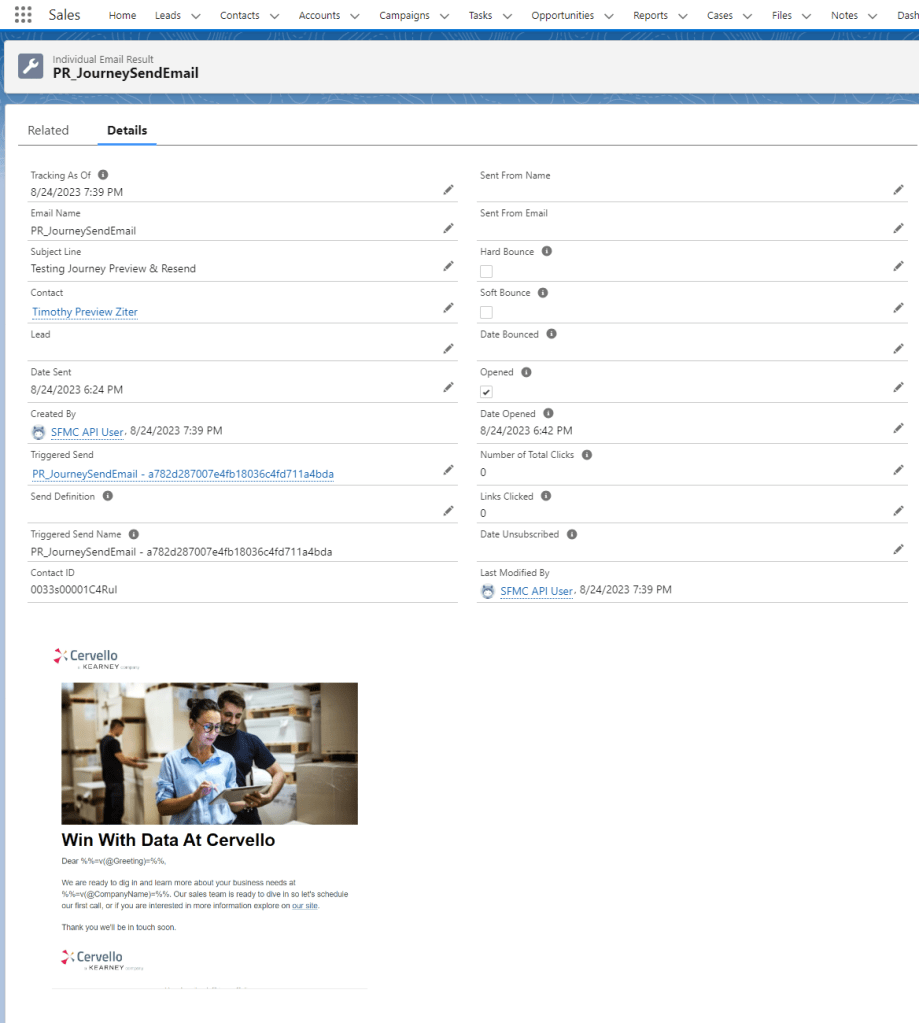
Here’s a closer look at what the thumbnail looks like when zooming in.

In this use case we are using simple personalization variables of greeting and company name. If the email is highly personalized, the entire email could be in ampscript code, making the previewing of the email sent to the contact relatively useless.
Problem #1 – Can’t Preview the email
As you can see above there’s no way to consistently view the email that was sent to a contact/lead AND even if available to view it can be full of code not showing what the actual contact/lead received.
Sales needs a way to improve the experience by:
– Always seeing an email preview
– Have the preview be large, not a tiny thumbnail
– Most importantly accurately show the “send-time” personalization of the actual email
Problem #2 – Can’t resend the individual email
Sales has no way to resend this email. If it was sent through Marketing Cloud it could be part of an email send of thousands. Even if the sales person had access to Marketing Cloud it would be like finding a needle in a haystack to determine the actual email content and all data needed to customize the email, not to mention being capable of sending a single email.
Sales needs the ability to resend the previewed email with a click of the button right in the Salesforce platform.
The Preview-Resend Experience
With Preview-Resend enabled sales can preview and resend and email in two easy steps.
(1) Select the Email Preview button on the email send

With Preview-Resend enabled the Email Preview button will appear on every Individual Email Results record. Sales simply needs to click on the contact, find the individual email results record and click email preview.
(2) After previewing the email, simply select the Resend button
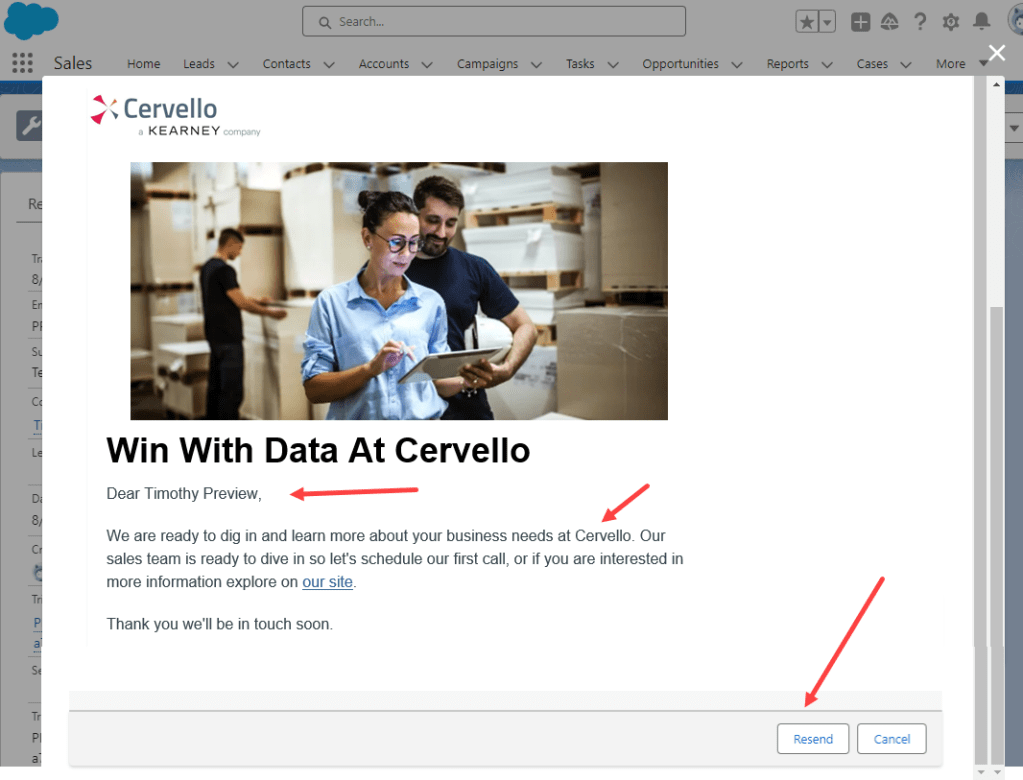
A window pops up featuring a large rendition of the email with the send-time presonalization populated to give sales a complete picture of what the contact/lead would have recieved.
And to resend the email all they need to do is click the Resend button. A pop up will appear confirming the send that’s it.
A minute or two later the contact or lead will receive the email again.
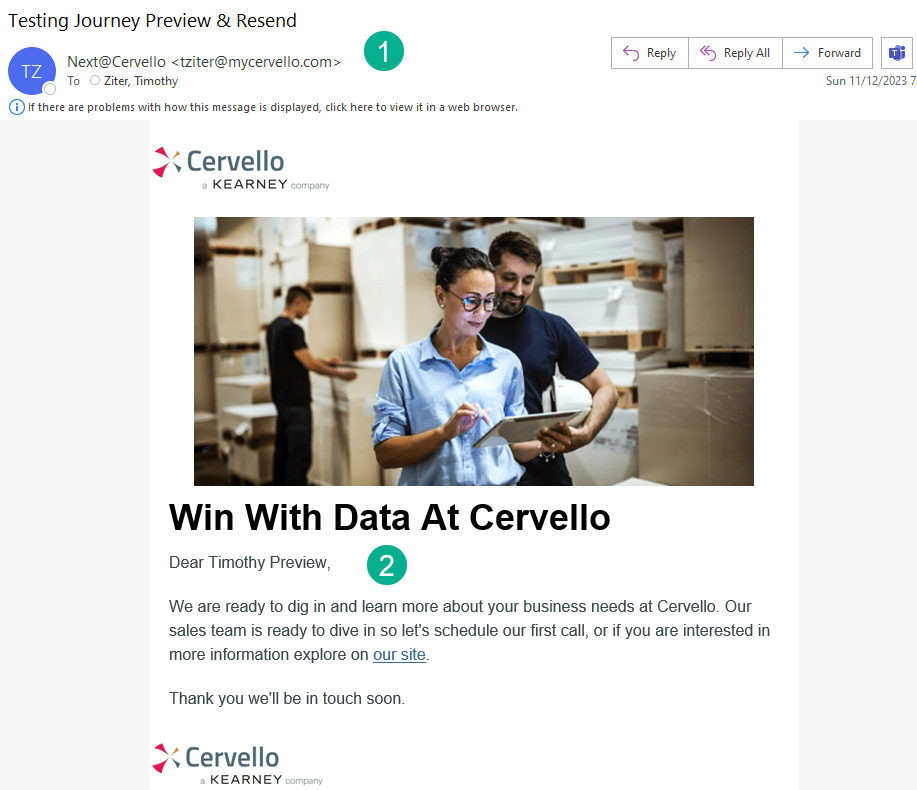
(1) You can customize the sender profile to have the email come from the sales person or it could be generic.
(2) The send-time personalization like the original send will appear in the email, an exact rendition of the first send.
The team has built this functionality in our sandbox Sales Cloud and Marketing Cloud environments. And in the coming weeks we’ll share our efforts to publish the amazing app in app exchange so everyone can utilize it for free. Stay tuned.
 handsonsfmc.com
Leave a comment