
Welcome to the SSJS Bootcamp hosted by Jyothsna Bitra as part of the Phoenix Salesforce Marketer Group. This is part two of the overview that covers the key areas of SSJS and provide exercises along the way to help learn and grow with this fascinating language.
For more information on the Phoenix Salesforce Marketer Group please follow this link to sign up: https://trailblazercommunitygroups.com/salesforce-marketer-group-marketing-cloud-phoenix-united-states/
Operators – Artithmetic
There are a series of operators in the SSJS language. The first usefull set Arithmetic give the capability not only to add/subtract/multiply/divide but also to concatenate string variable. Here’s an overview of the options:
- (+) adds two numeric operands or can concatenate two strings
- (-) subtract the right operand from the left
- (*) multiply two operands
- (/) divide left operand by right
- (%) modulus operator – returns what’s left over after dividing (i.e. 5%2 = 1)
- (++) increment operator – increment number by one
- (–) decrement operator – reduces number by one

We recommend following the steps in our Part I Overview walkthrough to set up a testing environment in your SFMC instance: https://handsonsfmc.com/server-side-java-script-bootcamp-day-i-overview/
If you are starting out in SSJS taking the time to validate that each one of these operators works as expected will be worth the effort. If you don’t have access to a SFMC org you can try java script playgrounds like: https://jsfiddle.net/ but you’ll find that the code might not work in both environments.
Also experiment with the syntax for the ++ and — functions as we’ve seen it documented to work x++ or x– but couldn’t get it to work on our end.
Here’s another set of equations that involve the + operator which illustrate the additional capabilities to concatenate strings together:
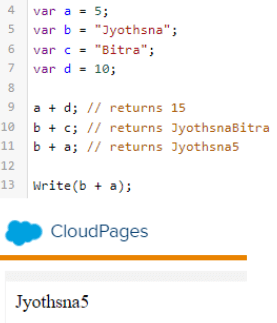
In the week two and three bootcamp (upcoming posts this week) sessions we’ll use this concatenation function as detailed below:

(1) To create the URL to make the Auth or Rest/Post call the url provided in the installed package needs to be combined with the end string based on the use case. In both of these scenarios the auth/restBaseURIs are set as variables and concatenated with a text string to create the necessary URLs.
(2) In the Rest/Post call the headerValues variable is the combination of specific text starting with “Bearer(space)” plus the token variable that was set by the auth call.
Operators – Comparison
Comparison operators are essential when utilizing IF/THEN statements in the code. The is equal and not equal to type options are interesting as these aren’t available in ampscript. This might be helpful in validating data that comes though on a form page.
- (==) is equal to (think of is as the first and equal as the second equal sign)
- (===) is equal value and equal type
- (!=) is not equal to
- (!==) is not equal to value or not equal to type
- (>) is greater than
- (<) is less than
- (>=) is greater than or equal to
- (<=) is less than or equal to
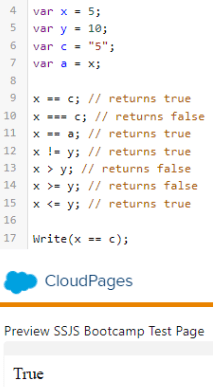
Using the comparison operator in an IF statement the SSJS syntax is quite different than ampscript:

(1) The IF statement feels stand-along separated by a semicolon. And note the additional features available in SSJS being able to select variables in an object.
(2) No THEN or ENDIF is required, only setting another variable with the intended result surrounded by handlebar brackets.
Operators – Logical
There are some very helpful logical operators to add additional functionality to IF statements and data validation as detailed below.
- (&&) and
- (||) or
- (!) not

Conditional Statements
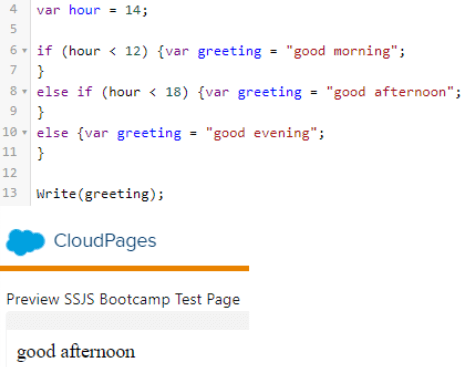
We started going over IF syntax already and here’s a few more examples of the syntax along with Else syntax. Again there is no need for a THEN or ENDIF which makes these statements very simple.
- IF
- ELSE
- ELSE IF
Loops!
We need our loops right? If you are used to the syntax in ampscript for loops it’s surprising how simple the syntax is in SSJS

(1) Initializing expression: set your variable which will count the loops
(2) Conditional expression: to continue looping based on the count of the variables in the laptop array (in this case three times). Notice use of the less than conditional operator.
(3) Increment expression: Use the arithmetic operator to increase the count of your variable by one after each loop.
(4) Statement: The “\n” adds a space between each value (which is weird because in Javascript syntax that’s a new line).
Core vs Platform Functions
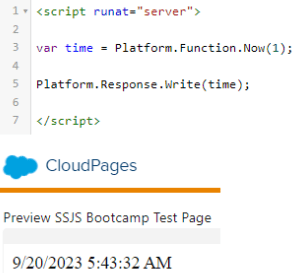
Use core and platform functions together to build out your SSJS code. In future sessions we’ll be using platform functions like GetValue to convert Ampscript variables to SSJS variables and much more. These platform functions are listed in the Salesforce documentation: https://developer.salesforce.com/docs/marketing/marketing-cloud/guide/ssjs_platformFunctions.html
You don’t need to load the Core library if your solution is only platform based. Try experimenting with the following code to validate functionality.
Resources!
Check out these amazing resources to further your learning in SSJS.
(1) Eliot Harper SSJS bootcamp videos part I and Part II:
https://www.youtube.com/watch?v=4dPlrrf7HG0
(2) Salesforce SSJS syntax guide:
https://developer.salesforce.com/docs/marketing/marketing-cloud/guide/ssjs_syntaxGuide.html
Coming in our next blog post we’ll begin our journey to break down creating an API call via SSJS.
 handsonsfmc.com
Leave a comment