In this session the team builds out the simple part of the Cloud Pages Thank You page, the front facing Thank You message to the subscriber. In later sessions the team will build out the ability for the page to send an API call to the Wait Until Event activity to move the subscriber along.
Build Components
| Asset | Notes/tips |
| Cloud Pages | How to build a basic cloud page |
| Content Block Tip | Create content blocks while you build using the “Create Content block button |
How to save in content work as a content block
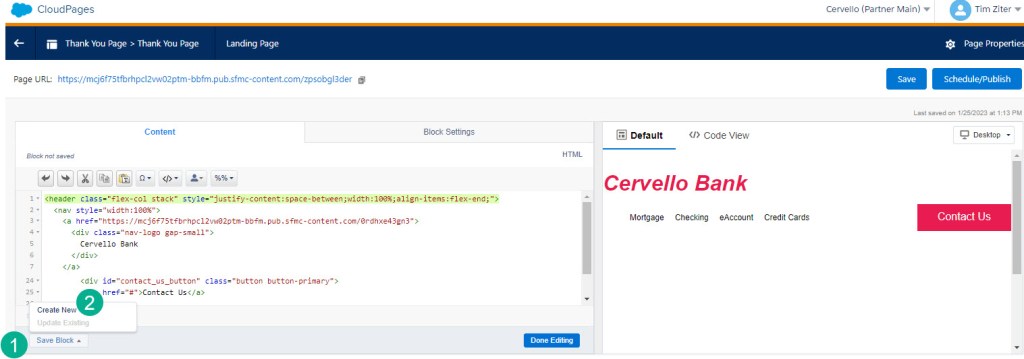
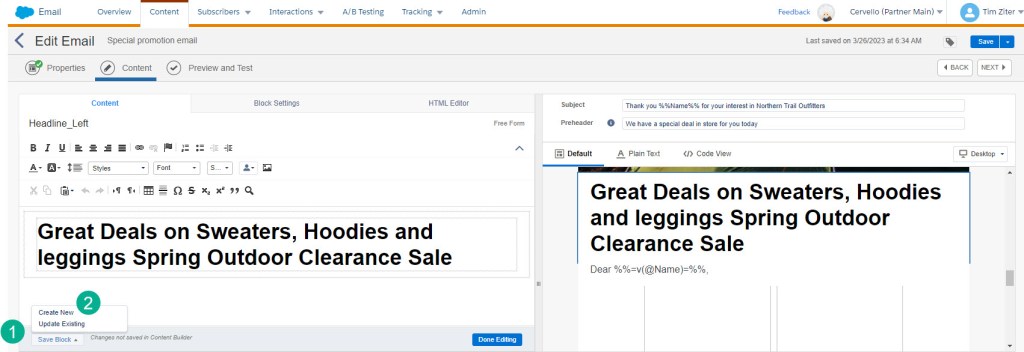
When working in a content piece whether it is a cloud page or an email you can select the (1) “Save Block” button in the lower left corner and (2) “Create New”.
For a Cloud Page:
For an email content:
Once you select create new please notice:
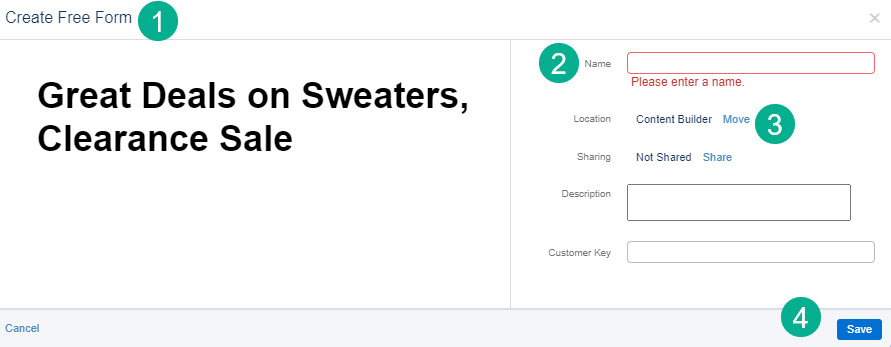
(1) The block will take on the characteristic of the block created in the content. You can’t switch from Free Form to Code Snippet for example.
(2) Enter the name for the content block
(3) Select where you want it to be saved
(4) Select save
 handsonsfmc.com
Leave a comment